# LocusGraph Builder Documentation
> LocusGraph - Structured Agent Knowledge that turns agent experience into compounding skills.
## Coding Agent Integration
Terminal commands, file edits, error tracking, and user intent — captured as structured agent knowledge.
import { Callout } from '../../components/Callout.tsx'
import { LinkCard } from '../../components/link-card.tsx'
import { CodeGroup } from '../../components/code-group.tsx'
### What Coding Agents Know
Coding agents generate unique knowledge that compounds across sessions: commands run, files edited, errors hit, and user instructions. Storing this knowledge in LocusGraph turns a stateless tool into a learning assistant whose skills grow with every session.
### Event Types for Coding Agents
#### Terminal Commands
Store commands as action events. Include the result and duration for future reference.
```typescript
await client.storeEvent({
graph_id: 'project-x',
event_kind: 'action',
source: 'executor',
context_id: 'project:api_server',
payload: { command: 'cargo test', result: 'PASS', duration_ms: 3200 },
});
```
#### Errors
Store errors as observation events. Track which errors recur and what fixed them — these are exactly the events that graduate into skills.
```typescript
await client.storeEvent({
graph_id: 'project-x',
event_kind: 'observation',
source: 'agent',
context_id: 'error:null_pointer',
payload: { file: 'src/auth.rs', line: 42, message: 'unwrap on None value', fix: 'Use Option::unwrap_or_default()' },
});
```
#### User Intent
Store what the user asked for and why as decision events. This helps the agent align future actions with user preferences.
```typescript
await client.storeEvent({
graph_id: 'project-x',
event_kind: 'decision',
source: 'user',
context_id: 'intent:refactor',
payload: { topic: 'error_handling', value: 'User wants all unwrap calls replaced with proper error handling' },
});
```
### Retrieve Before Acting
Before executing a task, query LocusGraph for relevant patterns and past errors. This prevents the agent from repeating known mistakes — exactly the failure mode flat memory systems leave open.
```typescript
const context = await client.retrieveMemories({
query: 'auth module errors and fixes',
limit: 5,
contextTypes: { error: ['null_pointer', 'auth_failure'] },
});
```
Always retrieve before acting on files you have edited before. The graph may contain validated fixes for errors you are about to reintroduce.
### Context Prefix Guide
Use consistent prefixes to organize coding knowledge:
| Prefix | Purpose | Example |
| ---------- | ------------------------- | -------------------- |
| `project:` | Project-level facts | `project:api_server` |
| `error:` | Error patterns and fixes | `error:null_pointer` |
| `file:` | File-specific knowledge | `file:src/auth.rs` |
| `intent:` | User instructions | `intent:refactor` |
| `test:` | Test results and patterns | `test:integration` |
Store the fix alongside the error. When the same error surfaces again, the agent retrieves both the problem and the solution in one query — the skill, not just the symptom.
### Next
## Memory-Augmented RAG
Combining document retrieval with structured agent knowledge.
import { Callout } from '../../components/Callout.tsx'
import { LinkCard } from '../../components/link-card.tsx'
import { CodeGroup } from '../../components/code-group.tsx'
### Beyond Standard RAG
Standard RAG retrieves documents. Memory-augmented RAG also retrieves agent experience. The result: context that includes not just what the documents say, but what the agent has learned from working with them.
### The Pattern
Retrieve from two sources, combine in the prompt:
1. **Document retriever** — fetch relevant docs from your vector DB.
2. **Knowledge retriever** — fetch relevant structured agent knowledge from LocusGraph.
3. **Combine** — merge both into the agent's context window.
```typescript
// 1. Retrieve documents (your existing RAG pipeline)
const docs = await vectorDB.search({
query: userQuery,
limit: 5,
});
// 2. Retrieve structured agent knowledge from LocusGraph
const knowledge = await client.retrieveMemories({
query: userQuery,
limit: 5,
});
// 3. Combine in prompt
const prompt = `
## Relevant Documents
${docs.map(d => d.content).join('\n\n')}
## Agent Knowledge
${knowledge.map(m => m.payload.value).join('\n\n')}
## User Question
${userQuery}
`;
```
### What Structured Agent Knowledge Adds
Documents tell you what exists. Structured agent knowledge tells you what works.
| Source | Provides |
| ---------- | ------------------------------------------------------------------- |
| Documents | API specs, guides, reference material |
| LocusGraph | Past mistakes, user preferences, learned patterns, graduated skills |
A document might say "use retry logic for network calls." LocusGraph adds "exponential backoff with a 3-second base works best for this API — linear retry caused rate limiting last week."
LocusGraph's semantic search works alongside any vector database. You do not replace your existing RAG pipeline — you augment it with validated agent knowledge.
### Storing RAG Outcomes
Close the loop by storing what the agent learns from each RAG interaction:
```typescript
// After answering, store what worked
await client.storeEvent({
graph_id: 'support-bot',
event_kind: 'observation',
source: 'agent',
context_id: 'rag:effectiveness',
payload: { topic: 'query_pattern', value: 'Users asking about auth need both the setup guide and the troubleshooting doc' },
});
```
Over time, LocusGraph learns which document combinations answer which question types. RAG gets smarter with every interaction.
### Next
## Multi-Agent Collaboration
Shared graphs, scoped contexts, agent-to-agent knowledge.
import { Callout } from '../../components/Callout.tsx'
import { LinkCard } from '../../components/link-card.tsx'
import { CodeGroup } from '../../components/code-group.tsx'
### Shared Graph, Scoped Contexts
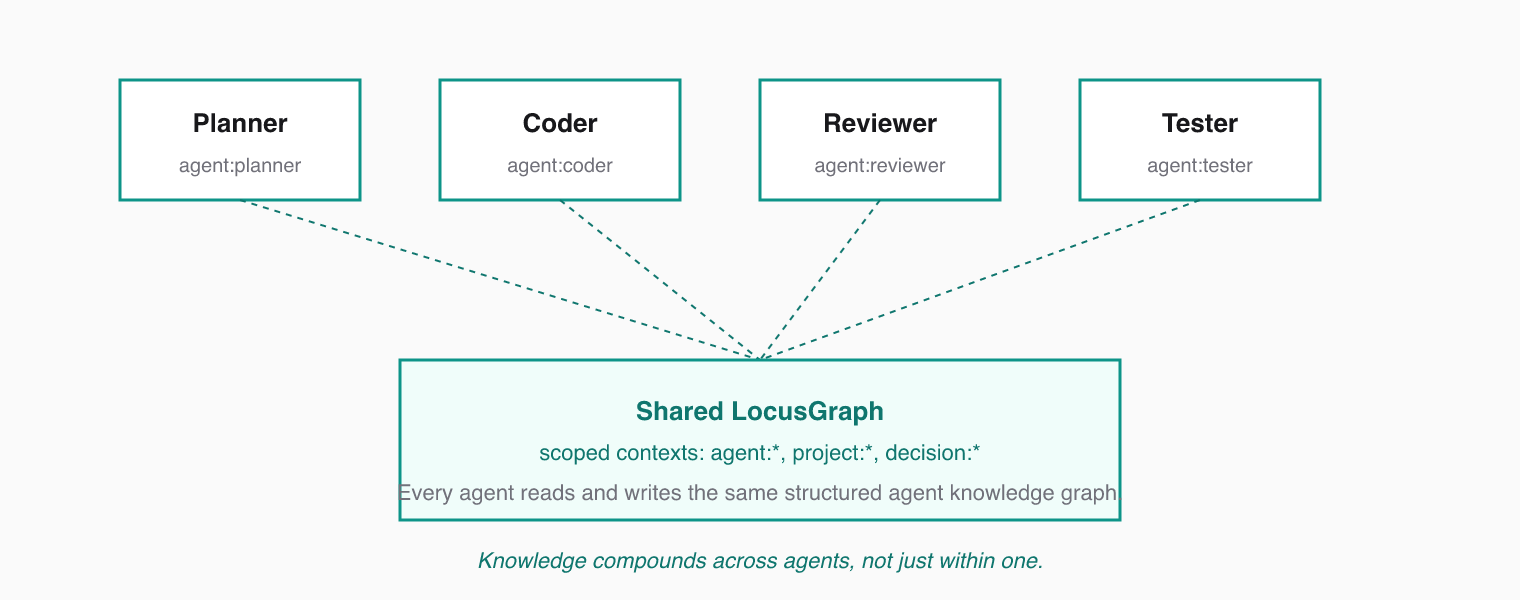
Multiple agents share a single LocusGraph. Each agent reads and writes to the same graph, but uses its own context prefix to organize its knowledge. Every agent gets the full Structured Agent Knowledge graph; contributions stay traceable.
 ### Context Prefixes by Role
Assign each agent a context prefix that reflects its role:
* `agent:planner` — high-level plans, decisions, priorities
* `agent:coder` — implementation details, code patterns, errors
* `agent:reviewer` — review feedback, quality observations
* `agent:tester` — test results, coverage gaps, flaky tests
Shared contexts like `project:api` or `decision:architecture` let agents communicate through stored knowledge instead of stuffing each other's chat logs into prompts.
### How Agents Collaborate
The pattern is simple: one agent stores, another retrieves.
```typescript
// Planner stores a decision
await client.storeEvent({
graph_id: 'team-project',
event_kind: 'decision',
source: 'planner',
context_id: 'agent:planner',
payload: { topic: 'auth_approach', value: 'Use JWT with refresh tokens, 15-minute expiry' },
});
// Coder retrieves planner decisions before implementing
const decisions = await client.retrieveMemories({
query: 'authentication design decisions',
limit: 5,
contextTypes: { agent: ['planner'] },
});
```
The `contextTypes` filter scopes retrieval to specific context prefixes. The coder retrieves only planner decisions without wading through its own past events.
Use `contextTypes` to filter by role. An agent that retrieves everything gets noise. An agent that retrieves from the right contexts gets validated signal.
### Cross-Agent Knowledge Flow
A typical multi-agent flow:
1. **Planner** stores task breakdowns and architectural decisions.
2. **Coder** retrieves decisions, implements, and stores code patterns and errors encountered.
3. **Reviewer** retrieves code patterns and implementation notes, then stores review feedback.
4. **Planner** retrieves review feedback and error patterns, adjusts future plans.
Each agent improves the shared graph. Knowledge compounds across all agents, not just within one.
Keep context prefixes consistent across sessions. Changing prefixes fragments the graph and breaks retrieval.
### Next
## Workflows Overview
How agents put Structured Agent Knowledge to work in practice. Every workflow in this section sits on top of the same loop and the same graph.
import { Callout } from '../../components/Callout.tsx'
import { LinkCard } from '../../components/link-card.tsx'
### The Core Agent Loop
Every LocusGraph-powered agent follows the same loop:
### Context Prefixes by Role
Assign each agent a context prefix that reflects its role:
* `agent:planner` — high-level plans, decisions, priorities
* `agent:coder` — implementation details, code patterns, errors
* `agent:reviewer` — review feedback, quality observations
* `agent:tester` — test results, coverage gaps, flaky tests
Shared contexts like `project:api` or `decision:architecture` let agents communicate through stored knowledge instead of stuffing each other's chat logs into prompts.
### How Agents Collaborate
The pattern is simple: one agent stores, another retrieves.
```typescript
// Planner stores a decision
await client.storeEvent({
graph_id: 'team-project',
event_kind: 'decision',
source: 'planner',
context_id: 'agent:planner',
payload: { topic: 'auth_approach', value: 'Use JWT with refresh tokens, 15-minute expiry' },
});
// Coder retrieves planner decisions before implementing
const decisions = await client.retrieveMemories({
query: 'authentication design decisions',
limit: 5,
contextTypes: { agent: ['planner'] },
});
```
The `contextTypes` filter scopes retrieval to specific context prefixes. The coder retrieves only planner decisions without wading through its own past events.
Use `contextTypes` to filter by role. An agent that retrieves everything gets noise. An agent that retrieves from the right contexts gets validated signal.
### Cross-Agent Knowledge Flow
A typical multi-agent flow:
1. **Planner** stores task breakdowns and architectural decisions.
2. **Coder** retrieves decisions, implements, and stores code patterns and errors encountered.
3. **Reviewer** retrieves code patterns and implementation notes, then stores review feedback.
4. **Planner** retrieves review feedback and error patterns, adjusts future plans.
Each agent improves the shared graph. Knowledge compounds across all agents, not just within one.
Keep context prefixes consistent across sessions. Changing prefixes fragments the graph and breaks retrieval.
### Next
## Workflows Overview
How agents put Structured Agent Knowledge to work in practice. Every workflow in this section sits on top of the same loop and the same graph.
import { Callout } from '../../components/Callout.tsx'
import { LinkCard } from '../../components/link-card.tsx'
### The Core Agent Loop
Every LocusGraph-powered agent follows the same loop:
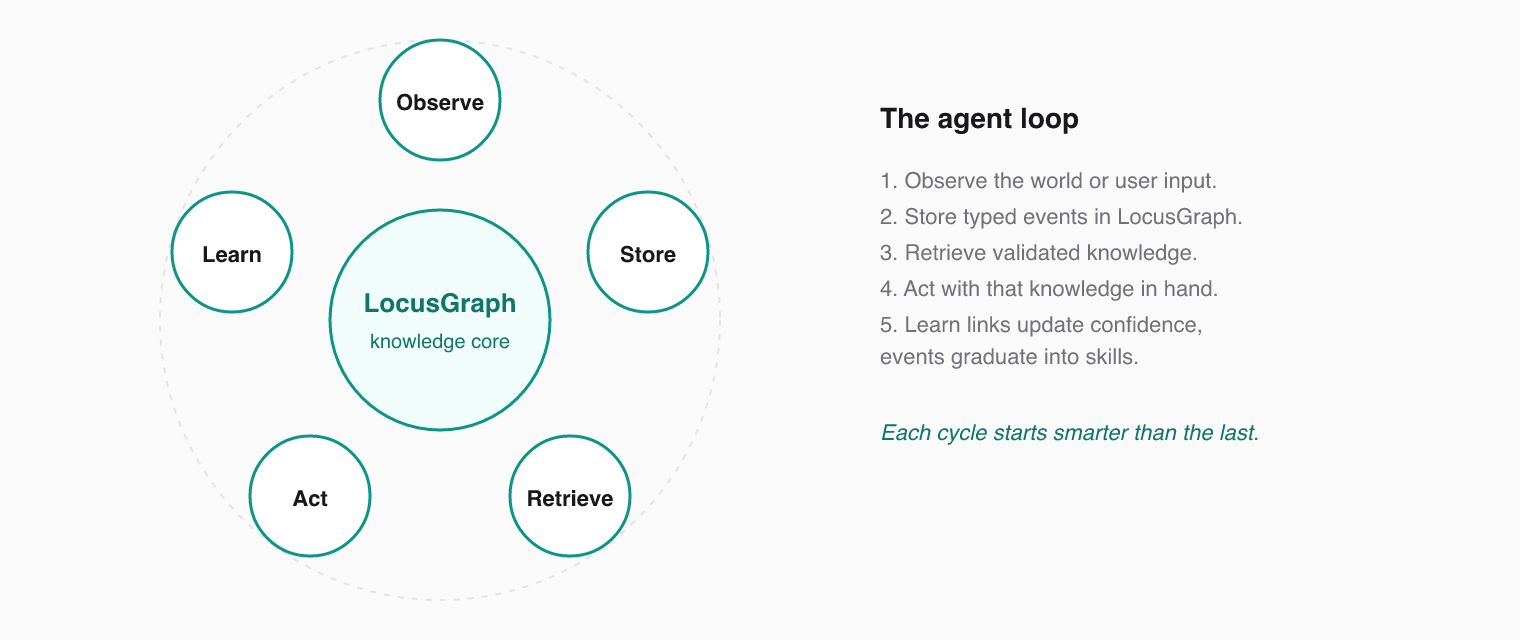 This loop runs every session. Over time, knowledge compounds — each session starts smarter than the last because events graduate into patterns and patterns graduate into skills.
### How Sessions Work
Every session starts by retrieving relevant context. The agent queries the graph for recent events, known patterns, and past decisions related to the current task. This grounds the agent in what it already knows.
During the session, every meaningful action gets stored as an event. Commands run, files edited, errors encountered, decisions made — all become loci in the graph.
At session end, the agent summarizes what happened and links durable learnings to persistent contexts. Ephemeral details fade; validated knowledge persists.
### Choosing a Workflow
Different agent architectures call for different workflows:
* **Single agent** — one agent, one graph, knowledge compounding across sessions. The simplest starting point.
* **Multi-agent** — multiple agents share a graph, each with scoped contexts. Agents collaborate through shared knowledge.
* **Memory-augmented RAG** — combine document retrieval with structured agent knowledge for richer context.
* **Session and long-term** — manage the lifecycle of ephemeral session data and durable knowledge.
* **Coding agent** — specialized patterns for terminal commands, file edits, error tracking, and user intent.
Start with the single agent workflow. Add multi-agent coordination or RAG augmentation as your system grows.
### Next
## Session & Long-Term Memory
Managing session lifecycle and durable structured agent knowledge.
import { Callout } from '../../components/Callout.tsx'
import { LinkCard } from '../../components/link-card.tsx'
import { CodeGroup } from '../../components/code-group.tsx'
### Two Tiers of Knowledge
LocusGraph operates on two tiers:
* **Session memory** — ephemeral events tied to a single session. Useful for tracking what happened, but not all of it needs to persist.
* **Long-term knowledge** — durable facts, patterns, and skills that persist across all sessions. This is the compounding value.
Memory is recall. Long-term knowledge is understanding. The job of the session lifecycle is to graduate the right session events into long-term knowledge.
### Session Lifecycle
#### 1. Start
Create a session context with a unique identifier.
```typescript
const sessionId = `session:${Date.now().toString(36)}`;
```
#### 2. Observe
Store events tagged with the session context as work progresses.
```typescript
await client.storeEvent({
graph_id: 'default',
event_kind: 'observation',
context_id: 'session:2025_03_19',
payload: { topic: 'debugging', value: 'Found race condition in auth middleware' },
});
```
#### 3. Summarize and Graduate
At session end, extract durable knowledge and store it under permanent contexts. Use `extends` to link the new knowledge back to the session it came from.
```typescript
await client.storeEvent({
graph_id: 'default',
event_kind: 'fact',
context_id: 'skill:concurrency',
extends: ['session:2025_03_19'],
payload: { topic: 'race_condition_fix', value: 'Use mutex guards around shared auth state' },
});
```
The session observation stays in the graph for traceability. The graduated fact lives under `skill:concurrency` and surfaces in future retrievals about concurrency — regardless of session.
Not every session event deserves graduation. Store session events generously, but graduate only the knowledge that will matter next week. That is what keeps the structured agent knowledge layer dense and high-signal.
### What Graduates
| Session Event | Graduates To |
| --------------------------------- | ------------------------------------------------------------------------ |
| "Found race condition in auth" | `skill:concurrency` — "Use mutex guards around shared auth state" |
| "User prefers verbose logging" | `preference:logging` — "Enable verbose logging by default" |
| "Retry logic fixed timeout issue" | `skill:error_handling` — "Exponential backoff with 3s base for this API" |
### Retrieval Across Tiers
Retrieve from both tiers in a single query. Long-term knowledge ranks higher by default because it has been validated across sessions.
```typescript
const context = await client.retrieveMemories({
query: 'concurrency patterns for auth',
limit: 10,
});
// Returns both session observations and long-term knowledge, ranked by relevance and confidence
```
Use `contextTypes` to retrieve only long-term knowledge (`skill`, `fact`, `preference`) or only session data (`session`) depending on the task.
### Next
## Single Agent Loop
One agent, structured knowledge compounding across sessions.
import { Callout } from '../../components/Callout.tsx'
import { LinkCard } from '../../components/link-card.tsx'
import { CodeGroup } from '../../components/code-group.tsx'
### The Simplest Pattern
The single agent loop is the foundation of every LocusGraph workflow: one agent, one graph. The agent stores what it learns and retrieves what it needs. Each session builds on the last because events graduate into patterns and patterns graduate into skills.
### Session Start: Retrieve Context
Begin every session by pulling recent context from the graph. A broad query surfaces the most relevant prior knowledge.
### During Session: Store Events
As the agent observes, decides, and acts, store each meaningful event. Tag events with descriptive contexts so they can be retrieved later and linked to related learnings.
### Session End: Summarize
Close the session by storing a summary event. This captures the session's key outcomes in a single retrievable node and gives the next session a clean starting point.
### Full Example
```typescript
const client = new LocusGraphClient({ graphId: 'my-project' });
// Session start — retrieve recent knowledge
const context = await client.retrieveMemories({
query: 'recent work and decisions',
limit: 10,
});
// During work — store what you learn
await client.storeEvent({
graph_id: 'my-project',
event_kind: 'fact',
source: 'agent',
context_id: 'skill:error_handling',
payload: { topic: 'retry_pattern', value: 'Use exponential backoff for network errors' },
});
// Session end — summarize
await client.storeEvent({
graph_id: 'my-project',
event_kind: 'observation',
source: 'agent',
context_id: 'session:2025_03_19',
payload: { topic: 'session_summary', value: 'Refactored error handling to use exponential backoff' },
});
```
The `context_id` field is how you organize knowledge. Use prefixes like `skill:`, `session:`, or `project:` to create a natural taxonomy that supports the event → pattern → skill graduation chain.
### What Gets Stored
Focus on events that compound over time:
* **Facts** — durable knowledge the agent discovers (e.g., "this API requires auth headers").
* **Observations** — patterns noticed during work (e.g., "tests fail when DB migrations are pending").
* **Decisions** — choices made and why (e.g., "chose REST over gRPC for simplicity").
* **Summaries** — session-level recaps that anchor future retrieval.
### Next
## FAQ & Troubleshooting
Direct answers to the most common LocusGraph questions.
import { Callout } from '../../components/Callout.tsx'
import { LinkCard } from '../../components/link-card.tsx'
### General
#### What is LocusGraph in one sentence?
LocusGraph is the structured agent knowledge layer that turns what your agents learn into knowledge that compounds, so events become patterns, patterns become skills, and every session starts smarter.
#### How is this different from agent memory or a vector store?
Memory means recall. LocusGraph delivers knowledge — typed events, scoped contexts, typed links, and confidence scoring that ensures only validated knowledge gets brought to the forefront. Vector stores retrieve similar text. LocusGraph evolves knowledge from event to pattern to skill.
#### How do I get an agent secret?
Sign up at [locusgraph.com](https://locusgraph.com) and create an agent from the dashboard. Each agent receives a unique secret.
#### What is the difference between a graph and a context?
A graph is an isolated workspace — like a database. A context is a label within a graph — like a table. One graph can hold thousands of contexts.
#### Can multiple agents share the same graph?
Yes. Use different context prefixes per agent role (e.g., `agent:planner`, `agent:coder`) and filter with `context_types` during retrieval.
### Storing Knowledge
#### Why was my event filtered?
LocusGraph's admission pipeline filters routine and noise events. Events with kind `routine`, `heartbeat`, `status`, `noise`, `debug`, or `log` are typically filtered. Use `fact`, `action`, `decision`, `observation`, or `feedback` instead.
#### Is there a size limit for payloads?
Yes — 256KB per event payload. Keep payloads focused and flat so events graduate cleanly.
#### What happens when two pieces of knowledge contradict each other?
The `contradicts` link reduces the target's confidence by 0.10 (floor 0.2). Lower-confidence knowledge ranks lower in retrieval results. The newer information effectively overrides the old without erasing the audit trail.
### Retrieving Knowledge
#### How do I scope retrieval to specific knowledge?
Use the `context_ids` or `context_types` filters in `retrieve_memories`. Example:
```typescript
contextTypes: { skill: ["react", "typescript"] }
```
This retrieves only from those specific contexts.
### Connectivity
#### The SDK cannot connect — what do I check?
Run through this checklist in order. Most connection issues are resolved by step 1.
1. `LOCUSGRAPH_AGENT_SECRET` is set and valid.
2. `LOCUSGRAPH_SERVER_URL` is correct (default: `https://api.locusgraph.com`).
3. Your network or firewall allows outbound HTTPS on port 443.
### Next
This loop runs every session. Over time, knowledge compounds — each session starts smarter than the last because events graduate into patterns and patterns graduate into skills.
### How Sessions Work
Every session starts by retrieving relevant context. The agent queries the graph for recent events, known patterns, and past decisions related to the current task. This grounds the agent in what it already knows.
During the session, every meaningful action gets stored as an event. Commands run, files edited, errors encountered, decisions made — all become loci in the graph.
At session end, the agent summarizes what happened and links durable learnings to persistent contexts. Ephemeral details fade; validated knowledge persists.
### Choosing a Workflow
Different agent architectures call for different workflows:
* **Single agent** — one agent, one graph, knowledge compounding across sessions. The simplest starting point.
* **Multi-agent** — multiple agents share a graph, each with scoped contexts. Agents collaborate through shared knowledge.
* **Memory-augmented RAG** — combine document retrieval with structured agent knowledge for richer context.
* **Session and long-term** — manage the lifecycle of ephemeral session data and durable knowledge.
* **Coding agent** — specialized patterns for terminal commands, file edits, error tracking, and user intent.
Start with the single agent workflow. Add multi-agent coordination or RAG augmentation as your system grows.
### Next
## Session & Long-Term Memory
Managing session lifecycle and durable structured agent knowledge.
import { Callout } from '../../components/Callout.tsx'
import { LinkCard } from '../../components/link-card.tsx'
import { CodeGroup } from '../../components/code-group.tsx'
### Two Tiers of Knowledge
LocusGraph operates on two tiers:
* **Session memory** — ephemeral events tied to a single session. Useful for tracking what happened, but not all of it needs to persist.
* **Long-term knowledge** — durable facts, patterns, and skills that persist across all sessions. This is the compounding value.
Memory is recall. Long-term knowledge is understanding. The job of the session lifecycle is to graduate the right session events into long-term knowledge.
### Session Lifecycle
#### 1. Start
Create a session context with a unique identifier.
```typescript
const sessionId = `session:${Date.now().toString(36)}`;
```
#### 2. Observe
Store events tagged with the session context as work progresses.
```typescript
await client.storeEvent({
graph_id: 'default',
event_kind: 'observation',
context_id: 'session:2025_03_19',
payload: { topic: 'debugging', value: 'Found race condition in auth middleware' },
});
```
#### 3. Summarize and Graduate
At session end, extract durable knowledge and store it under permanent contexts. Use `extends` to link the new knowledge back to the session it came from.
```typescript
await client.storeEvent({
graph_id: 'default',
event_kind: 'fact',
context_id: 'skill:concurrency',
extends: ['session:2025_03_19'],
payload: { topic: 'race_condition_fix', value: 'Use mutex guards around shared auth state' },
});
```
The session observation stays in the graph for traceability. The graduated fact lives under `skill:concurrency` and surfaces in future retrievals about concurrency — regardless of session.
Not every session event deserves graduation. Store session events generously, but graduate only the knowledge that will matter next week. That is what keeps the structured agent knowledge layer dense and high-signal.
### What Graduates
| Session Event | Graduates To |
| --------------------------------- | ------------------------------------------------------------------------ |
| "Found race condition in auth" | `skill:concurrency` — "Use mutex guards around shared auth state" |
| "User prefers verbose logging" | `preference:logging` — "Enable verbose logging by default" |
| "Retry logic fixed timeout issue" | `skill:error_handling` — "Exponential backoff with 3s base for this API" |
### Retrieval Across Tiers
Retrieve from both tiers in a single query. Long-term knowledge ranks higher by default because it has been validated across sessions.
```typescript
const context = await client.retrieveMemories({
query: 'concurrency patterns for auth',
limit: 10,
});
// Returns both session observations and long-term knowledge, ranked by relevance and confidence
```
Use `contextTypes` to retrieve only long-term knowledge (`skill`, `fact`, `preference`) or only session data (`session`) depending on the task.
### Next
## Single Agent Loop
One agent, structured knowledge compounding across sessions.
import { Callout } from '../../components/Callout.tsx'
import { LinkCard } from '../../components/link-card.tsx'
import { CodeGroup } from '../../components/code-group.tsx'
### The Simplest Pattern
The single agent loop is the foundation of every LocusGraph workflow: one agent, one graph. The agent stores what it learns and retrieves what it needs. Each session builds on the last because events graduate into patterns and patterns graduate into skills.
### Session Start: Retrieve Context
Begin every session by pulling recent context from the graph. A broad query surfaces the most relevant prior knowledge.
### During Session: Store Events
As the agent observes, decides, and acts, store each meaningful event. Tag events with descriptive contexts so they can be retrieved later and linked to related learnings.
### Session End: Summarize
Close the session by storing a summary event. This captures the session's key outcomes in a single retrievable node and gives the next session a clean starting point.
### Full Example
```typescript
const client = new LocusGraphClient({ graphId: 'my-project' });
// Session start — retrieve recent knowledge
const context = await client.retrieveMemories({
query: 'recent work and decisions',
limit: 10,
});
// During work — store what you learn
await client.storeEvent({
graph_id: 'my-project',
event_kind: 'fact',
source: 'agent',
context_id: 'skill:error_handling',
payload: { topic: 'retry_pattern', value: 'Use exponential backoff for network errors' },
});
// Session end — summarize
await client.storeEvent({
graph_id: 'my-project',
event_kind: 'observation',
source: 'agent',
context_id: 'session:2025_03_19',
payload: { topic: 'session_summary', value: 'Refactored error handling to use exponential backoff' },
});
```
The `context_id` field is how you organize knowledge. Use prefixes like `skill:`, `session:`, or `project:` to create a natural taxonomy that supports the event → pattern → skill graduation chain.
### What Gets Stored
Focus on events that compound over time:
* **Facts** — durable knowledge the agent discovers (e.g., "this API requires auth headers").
* **Observations** — patterns noticed during work (e.g., "tests fail when DB migrations are pending").
* **Decisions** — choices made and why (e.g., "chose REST over gRPC for simplicity").
* **Summaries** — session-level recaps that anchor future retrieval.
### Next
## FAQ & Troubleshooting
Direct answers to the most common LocusGraph questions.
import { Callout } from '../../components/Callout.tsx'
import { LinkCard } from '../../components/link-card.tsx'
### General
#### What is LocusGraph in one sentence?
LocusGraph is the structured agent knowledge layer that turns what your agents learn into knowledge that compounds, so events become patterns, patterns become skills, and every session starts smarter.
#### How is this different from agent memory or a vector store?
Memory means recall. LocusGraph delivers knowledge — typed events, scoped contexts, typed links, and confidence scoring that ensures only validated knowledge gets brought to the forefront. Vector stores retrieve similar text. LocusGraph evolves knowledge from event to pattern to skill.
#### How do I get an agent secret?
Sign up at [locusgraph.com](https://locusgraph.com) and create an agent from the dashboard. Each agent receives a unique secret.
#### What is the difference between a graph and a context?
A graph is an isolated workspace — like a database. A context is a label within a graph — like a table. One graph can hold thousands of contexts.
#### Can multiple agents share the same graph?
Yes. Use different context prefixes per agent role (e.g., `agent:planner`, `agent:coder`) and filter with `context_types` during retrieval.
### Storing Knowledge
#### Why was my event filtered?
LocusGraph's admission pipeline filters routine and noise events. Events with kind `routine`, `heartbeat`, `status`, `noise`, `debug`, or `log` are typically filtered. Use `fact`, `action`, `decision`, `observation`, or `feedback` instead.
#### Is there a size limit for payloads?
Yes — 256KB per event payload. Keep payloads focused and flat so events graduate cleanly.
#### What happens when two pieces of knowledge contradict each other?
The `contradicts` link reduces the target's confidence by 0.10 (floor 0.2). Lower-confidence knowledge ranks lower in retrieval results. The newer information effectively overrides the old without erasing the audit trail.
### Retrieving Knowledge
#### How do I scope retrieval to specific knowledge?
Use the `context_ids` or `context_types` filters in `retrieve_memories`. Example:
```typescript
contextTypes: { skill: ["react", "typescript"] }
```
This retrieves only from those specific contexts.
### Connectivity
#### The SDK cannot connect — what do I check?
Run through this checklist in order. Most connection issues are resolved by step 1.
1. `LOCUSGRAPH_AGENT_SECRET` is set and valid.
2. `LOCUSGRAPH_SERVER_URL` is correct (default: `https://api.locusgraph.com`).
3. Your network or firewall allows outbound HTTPS on port 443.
### Next
import { Callout } from '../../components/Callout.tsx'
import { LinkCard } from '../../components/link-card.tsx'
import { CodeGroup } from '../../components/code-group.tsx'
## Python SDK
The official Python client for LocusGraph. Use it to wire your Python agent, LangChain pipeline, or backend service into Structured Agent Knowledge: store typed events, retrieve validated knowledge, and generate insights from one client.
### Installation
```bash
pip install locusgraph-client
# With LangChain support:
pip install locusgraph-client[langchain]
```
### Configuration
```python
from locusgraph_client import LocusGraphClient
client = LocusGraphClient(
server_url="https://api.locusgraph.com", # optional, default
agent_secret="your-agent-secret",
graph_id="default", # optional default graph
)
```
Set `LOCUSGRAPH_SERVER_URL` and `LOCUSGRAPH_AGENT_SECRET` as environment variables to avoid hardcoding credentials. The client reads these automatically when no explicit values are provided.
### Store Event
Add knowledge to LocusGraph with `store_event`. The admission pipeline turns each event into a locus in your structured agent knowledge graph.
```python
response = client.store_event({
"graph_id": "default",
"event_kind": "fact",
"source": "onboarding-flow",
"context_id": "user-preferences",
"payload": "User prefers dark mode and weekly email digests.",
"reinforces": ["ctx-abc123"],
"extends": [],
"contradicts": [],
"related_to": ["ctx-def456"],
"timestamp": "2025-01-15T10:30:00Z",
})
# StoreEventResponse
# response.event_id -> "evt-789"
# response.context_id -> "user-preferences"
# response.status -> "stored"
```
### Retrieve Knowledge
Run semantic search across your structured agent knowledge with `retrieve_memories`.
```python
result = client.retrieve_memories(
query="What are the user notification preferences?",
graph_id="default",
limit=5,
context_ids=["user-preferences"],
context_types=["fact", "decision"],
)
# ContextResult
# result.memories -> [
# { context_id: "user-preferences", content: "...", score: 0.92, ... }
# ]
```
### Get Context
Fetch a single context by ID. Raises `RuntimeError("Context not found")` on 404.
```python
try:
context = client.get_context(
context_id="user-preferences",
graph_id="default",
)
# GetContextResponse
# context.context_id -> "user-preferences"
# context.context_type -> "fact"
# context.content -> "User prefers dark mode..."
except RuntimeError as e:
print(e) # "Context not found"
```
### List Contexts
Browse, filter, and search contexts in your LocusGraph workspace.
#### List context types
```python
types = client.list_context_types(
graph_id="default",
page=0,
page_size=100,
)
# ContextTypesResponse
# types.context_types -> ["fact", "action", "decision", ...]
```
#### List contexts by type
```python
facts = client.list_contexts_by_type(
context_type="fact",
graph_id="default",
page=0,
page_size=50,
)
# ContextListResponse
# facts.contexts -> [{ context_id: "...", content: "...", ... }]
```
#### Search contexts
```python
results = client.search_contexts(
query="preferences",
graph_id="default",
limit=10,
)
# ContextSearchResponse
# results.contexts -> [...]
```
### Get Context Relationships
Explore how contexts connect within your structured agent knowledge graph.
```python
relationships = client.get_context_relationships(
context_type="fact",
context_name="user-preferences",
graph_id="default",
)
# ContextRelationshipsResponse
# relationships.reinforced_by -> [...]
# relationships.extended_by -> [...]
# relationships.contradicted_by -> [...]
```
### Generate Insights
Reason over your structured agent knowledge to produce synthesized answers.
```python
insight = client.generate_insights(
task="Summarize user preferences and suggest personalization strategies.",
graph_id="default",
locus_query="user preferences and settings",
limit=10,
context_ids=["user-preferences"],
context_types=["fact", "decision"],
)
# InsightResult
# insight.insight -> "Based on stored knowledge, the user prefers..."
# insight.sources -> ["ctx-abc123", "ctx-def456"]
# insight.confidence -> 0.89
```
### Environment Variables
| Variable | Description |
| ------------------------- | ------------------------------------------------------ |
| `LOCUSGRAPH_SERVER_URL` | API server URL (default: `https://api.locusgraph.com`) |
| `LOCUSGRAPH_AGENT_SECRET` | Your agent secret key |
### Next
import { Callout } from '../../components/Callout.tsx'
import { LinkCard } from '../../components/link-card.tsx'
## Rust SDK
The official Rust client for LocusGraph. Use it to embed Structured Agent Knowledge into performance-sensitive agents, backend services, or CLI tools: store typed events, retrieve validated knowledge, and generate insights from one blocking client.
### Installation
Add the dependency to your `Cargo.toml`:
```toml
[dependencies]
locusgraph-client = "0.1"
```
### Configuration
```rust
use locusgraph_client::{LocusGraphClient, LocusGraphConfig};
let config = LocusGraphConfig {
server_url: Some("https://api.locusgraph.com".to_string()),
agent_secret: Some("your-agent-secret".to_string()),
graph_id: Some("default".to_string()),
};
let client = LocusGraphClient::new(Some(config));
```
Set `LOCUSGRAPH_SERVER_URL` and `LOCUSGRAPH_AGENT_SECRET` as environment variables to avoid hardcoding credentials. The client reads these automatically when config values are `None`.
The Rust SDK uses a blocking HTTP API powered by `ureq`. All methods block the current thread until the response arrives.
### Store Event
Add knowledge to LocusGraph with `store_event`. The admission pipeline turns each event into a locus in your structured agent knowledge graph.
```rust
use locusgraph_client::CreateEventRequest;
let request = CreateEventRequest {
graph_id: "default".to_string(),
event_kind: "fact".to_string(),
source: Some("onboarding-flow".to_string()),
context_id: Some("user-preferences".to_string()),
payload: "User prefers dark mode and weekly email digests.".to_string(),
reinforces: Some(vec!["ctx-abc123".to_string()]),
extends: None,
contradicts: None,
related_to: Some(vec!["ctx-def456".to_string()]),
timestamp: Some("2025-01-15T10:30:00Z".to_string()),
};
let response = client.store_event(request)?;
// response.event_id -> "evt-789"
// response.context_id -> "user-preferences"
// response.status -> "stored"
```
### Retrieve Knowledge
Run semantic search across your structured agent knowledge with `retrieve_memories`.
```rust
let result = client.retrieve_memories(
"default", // graph_id
"What are the user notification preferences?", // query
Some(5), // limit
Some(vec!["user-preferences".to_string()]), // context_ids
Some(vec!["fact".to_string()]), // context_types
)?;
// result.memories -> Vec
// result.memories[0].content -> "User prefers weekly email digests."
// result.memories[0].score -> 0.92
// result.memories[0].context_type -> "fact"
```
### Get Context
Fetch a single context by ID. Returns an error if the context does not exist.
```rust
let context = client.get_context(
"user-preferences", // context_id
"default", // graph_id
)?;
// context.context_id -> "user-preferences"
// context.context_type -> "fact"
// context.content -> "User prefers dark mode..."
```
### List Context Types
Browse available context types in your structured agent knowledge graph.
```rust
let types = client.list_context_types(
"default", // graph_id
0, // page
100, // page_size
)?;
// types.context_types -> vec!["fact", "action", "decision", ...]
```
### Generate Insights
Reason over your structured agent knowledge and produce synthesized answers.
```rust
let insight = client.generate_insights(
"default", // graph_id
"Summarize user preferences and suggest personalization strategies.", // task
Some("user preferences and settings".to_string()), // locus_query
Some(10), // limit
Some(vec!["user-preferences".to_string()]), // context_ids
Some(vec!["fact".to_string(), "decision".to_string()]), // context_types
)?;
// insight.insight -> "Based on stored knowledge, the user prefers..."
// insight.sources -> vec!["ctx-abc123", "ctx-def456"]
// insight.confidence -> 0.89
```
### Environment Variables
| Variable | Description |
| ------------------------- | ------------------------------------------------------ |
| `LOCUSGRAPH_SERVER_URL` | API server URL (default: `https://api.locusgraph.com`) |
| `LOCUSGRAPH_AGENT_SECRET` | Your agent secret key |
### Next
import { Callout } from '../../components/Callout.tsx'
import { LinkCard } from '../../components/link-card.tsx'
import { CodeGroup } from '../../components/code-group.tsx'
## TypeScript SDK
The official TypeScript client for LocusGraph. Use it to wire your Node.js or LangChain agent into Structured Agent Knowledge: store typed events, retrieve validated knowledge, browse contexts, and generate insights — all from one client.
### Installation
```bash
npm install @locusgraph/client
```
### Configuration
```typescript
import { LocusGraphClient } from '@locusgraph/client';
const client = new LocusGraphClient({
serverUrl: 'https://api.locusgraph.com', // optional, default
agentSecret: 'your-agent-secret',
graphId: 'default', // optional default graph
});
```
Set `LOCUSGRAPH_SERVER_URL` and `LOCUSGRAPH_AGENT_SECRET` as environment variables to avoid hardcoding credentials. The client reads these automatically when no explicit values are provided.
### Store Event
Use `storeEvent` to add knowledge to LocusGraph. Each event captures a fact, action, decision, or observation that the admission pipeline turns into a locus.
```typescript
const response = await client.storeEvent({
graph_id: 'default',
event_kind: 'fact',
source: 'onboarding-flow',
context_id: 'user-preferences',
payload: 'User prefers dark mode and weekly email digests.',
reinforces: ['ctx-abc123'],
extends: [],
contradicts: [],
related_to: ['ctx-def456'],
timestamp: '2025-01-15T10:30:00Z',
});
// Response
// {
// eventId: 'evt-789',
// contextId: 'user-preferences',
// status: 'stored'
// }
```
| Field | Required | Description |
| ------------- | -------- | ------------------------------------------------------------------- |
| `graph_id` | Yes | Target graph identifier |
| `event_kind` | Yes | Event type: `fact`, `action`, `decision`, `observation`, `feedback` |
| `payload` | Yes | The knowledge content |
| `source` | No | Origin of the event |
| `context_id` | No | Group events under a context |
| `reinforces` | No | Array of context IDs this event reinforces |
| `extends` | No | Array of context IDs this event extends |
| `contradicts` | No | Array of context IDs this event contradicts |
| `related_to` | No | Array of related context IDs |
| `timestamp` | No | ISO 8601 timestamp string |
### Retrieve Knowledge
Use `retrieveMemories` to run semantic search across your structured agent knowledge graph.
```typescript
const result = await client.retrieveMemories({
graphId: 'default',
query: 'What are the user preferences for notifications?',
limit: 5,
contextIds: ['user-preferences'],
contextTypes: ['fact', 'decision'],
});
// Response
// {
// memories: [
// {
// contextId: 'user-preferences',
// content: 'User prefers weekly email digests.',
// score: 0.92,
// contextType: 'fact',
// timestamp: '2025-01-15T10:30:00Z'
// }
// ]
// }
```
| Field | Required | Description |
| -------------- | -------- | ----------------------------------- |
| `graphId` | No | Uses default from config if omitted |
| `query` | Yes | Natural language search query |
| `limit` | No | Max results to return |
| `contextIds` | No | Filter by specific context IDs |
| `contextTypes` | No | Filter by context types |
### Get Context
Fetch a single context by its ID. Throws `Error('Context not found')` on 404.
```typescript
try {
const context = await client.getContext({
context_id: 'user-preferences',
graph_id: 'default',
});
// Response
// {
// contextId: 'user-preferences',
// contextType: 'fact',
// content: 'User prefers dark mode and weekly email digests.',
// createdAt: '2025-01-15T10:30:00Z',
// updatedAt: '2025-01-15T10:30:00Z'
// }
} catch (err) {
console.error(err.message); // 'Context not found'
}
```
### List Contexts
Browse context types, list contexts by type, or search by name.
```typescript
// List all context types
const types = await client.listContexts({ graph_id: 'default' });
// List contexts by type
const facts = await client.listContexts({
graph_id: 'default',
context_type: 'fact',
});
// Search contexts by name
const results = await client.listContexts({
graph_id: 'default',
query: 'preferences',
});
```
### Generate Insights
Use `generateInsights` to reason over your structured agent knowledge and produce synthesized answers.
```typescript
const insight = await client.generateInsights({
graphId: 'default',
task: 'Summarize this user preferences and suggest personalization strategies.',
locusQuery: 'user preferences and settings',
limit: 10,
contextIds: ['user-preferences'],
contextTypes: ['fact', 'decision'],
});
// Response
// {
// insight: 'Based on stored knowledge, the user prefers dark mode...',
// sources: ['ctx-abc123', 'ctx-def456'],
// confidence: 0.89
// }
```
| Field | Required | Description |
| -------------- | -------- | ------------------------------------------ |
| `graphId` | No | Uses default from config if omitted |
| `task` | Yes | The reasoning task or question |
| `locusQuery` | No | Optional query to scope relevant knowledge |
| `limit` | No | Max source contexts to consider |
| `contextIds` | No | Filter by specific context IDs |
| `contextTypes` | No | Filter by context types |
### Environment Variables
| Variable | Description |
| ------------------------- | ------------------------------------------------------ |
| `LOCUSGRAPH_SERVER_URL` | API server URL (default: `https://api.locusgraph.com`) |
| `LOCUSGRAPH_AGENT_SECRET` | Your agent secret key |
### Next
## Claude Code
Connect Claude Code to LocusGraph over MCP. Once connected, Claude Code reads and writes the same Structured Agent Knowledge graph your other agents use — events stored from one client are immediately retrievable from any other. Use the production auth endpoint:
```text
https://api.locusgraph.com/mcp
```
import { Callout } from '../../components/Callout.tsx'
import { CodeGroup } from '../../components/code-group.tsx'
import { LinkCard } from '../../components/link-card.tsx'
Claude Code supports remote HTTP MCP servers and uses `/mcp` for OAuth authentication. This guide follows Anthropic's Claude Code MCP documentation for remote HTTP transport, configuration scopes, and OAuth behavior.
Official reference: [Connect Claude Code to tools via MCP](https://code.claude.com/docs/en/mcp)
### Add LocusGraph
HTTP is the recommended transport for remote cloud-hosted MCP services. Add LocusGraph with one of these commands:
```bash
claude mcp add --transport http locusgraph https://api.locusgraph.com/mcp
```
```bash
claude mcp add --transport http --scope project locusgraph https://api.locusgraph.com/mcp
```
```bash
claude mcp add --transport http --scope user locusgraph https://api.locusgraph.com/mcp
```
Scope choice:
* `local`: private to your current project on your machine
* `project`: shared via `.mcp.json` at the repo root
* `user`: available across your projects on your machine
Use `--scope project` when the whole team should see the same LocusGraph MCP server in the repo. Claude Code will create or update `.mcp.json`.
### Authenticate
LocusGraph uses OAuth at `https://api.locusgraph.com/mcp`. After adding the server:
1. Open Claude Code in the project where you want to use LocusGraph.
2. Run `/mcp`.
3. Select `locusgraph`.
4. Choose Authenticate if Claude Code shows the server as unauthenticated.
5. Finish the browser login flow, then select the graph you want to bind to the token.
6. Return to Claude Code and run `/mcp` again to confirm the server is connected.
Once connected, Claude Code should discover:
* `store_event`
* `retrieve_memories`
* `list_contexts`
* `generate_insights`
* `locusgraph://contexts`
* `auto_capture`
LocusGraph's production auth worker supports dynamic client registration, so the standard Claude Code OAuth flow should work without manually supplying `--client-id` or `--client-secret`.
### Shared `.mcp.json`
Project scope writes a repo-level `.mcp.json`. A minimal LocusGraph entry looks like this:
```json
{
"mcpServers": {
"locusgraph": {
"type": "http",
"url": "https://api.locusgraph.com/mcp"
}
}
}
```
Claude Code asks for approval before using project-scoped servers from `.mcp.json`. That is expected behavior for shared repo config.
### Fixed Callback Port
Claude Code can use a fixed localhost callback port when a server or organization requires a pre-registered redirect URI such as `http://localhost:8765/callback`.
```bash
claude mcp add --transport http --callback-port 8765 locusgraph https://api.locusgraph.com/mcp
```
For the default `api.locusgraph.com` setup, this is usually not required. Use it only if your OAuth setup depends on a specific localhost callback port.
### Verify
You can verify the server from the CLI and inside Claude Code:
```bash
claude mcp list
claude mcp get locusgraph
```
Then inside Claude Code:
```text
/mcp
```
If authentication completed correctly, Claude Code should show the server as connected and make the MCP tools available in-session.
### Troubleshooting
| Problem | Fix |
| ------------------------------------------- | ------------------------------------------------------------------------------ |
| Claude Code shows `Authentication required` | Run `/mcp`, select `locusgraph`, and complete the browser OAuth flow |
| Browser does not open automatically | Copy the auth URL from Claude Code and open it manually in the browser |
| Redirect fails after login | Paste the full callback URL from the browser back into Claude Code if prompted |
| Team members do not see the server | Use `--scope project` or commit the repo's `.mcp.json` |
| Tools are missing after auth | Reopen `/mcp` or restart the Claude Code session so capabilities refresh |
### Next
## Connecting MCP Clients
Connect any MCP client that supports remote HTTP MCP plus OAuth 2.0 discovery. The same connection gives every client access to the same Structured Agent Knowledge graph — no per-client integration work.
import { Steps, Step } from '../../components/step.tsx'
import { Callout } from '../../components/Callout.tsx'
import { CodeGroup } from '../../components/code-group.tsx'
import { LinkCard } from '../../components/link-card.tsx'
### Setup
You connect to the auth worker, not directly to a region server. The MCP endpoint is:
```text
https://api.locusgraph.com/mcp
```
The same auth worker also serves OAuth discovery:
```text
https://api.locusgraph.com/.well-known/oauth-protected-resource
https://api.locusgraph.com/.well-known/oauth-authorization-server
https://api.locusgraph.com/.well-known/openid-configuration
```
Configure your client to use the remote `/mcp` endpoint above. Do not point the client at a local `npx @locusgraph/mcp-server` command unless you intentionally maintain a separate stdio wrapper.
```text
MCP endpoint: https://api.locusgraph.com/mcp
Protected resource: https://api.locusgraph.com/.well-known/oauth-protected-resource
Authorization: OAuth 2.0 authorization code flow
```
```bash
OAUTH_REDIRECT_URL=https://api.locusgraph.com
MCP_OAUTH_CLIENT_ID=...
MCP_OAUTH_CLIENT_SECRET=...
MCP_OAUTH_REDIRECT_URIS=https://chat.openai.com/aip/callback
MCP_OAUTH_SCOPES=profile memory.read memory.write
OPENAI_APPS_CHALLENGE=...
```
When the client connects, the auth worker returns OAuth metadata and the client completes the authorization code flow:
1. The client discovers metadata from `/.well-known/oauth-protected-resource`
2. It registers dynamically at `/oauth/register`, or uses a preconfigured static client
3. The user signs in at `/oauth/authorize`
4. The user selects a graph
5. The auth worker returns an access token bound to that graph
Ask your client to:
1. initialize the MCP session
2. list tools
3. list resources
4. list prompts
You should see the four tools, the `locusgraph://contexts` resource, and the `auto_capture` prompt.
The auth worker accepts both dynamic OAuth clients and an env-managed static client. Static client credentials are configured with `MCP_OAUTH_CLIENT_ID`, `MCP_OAUTH_CLIENT_SECRET`, and `MCP_OAUTH_REDIRECT_URIS`.
The production auth base URL is `https://api.locusgraph.com`.
### Client-Specific Guides
Use the dedicated Claude Code page for the full remote HTTP, OAuth, scope, and `.mcp.json` setup flow:
### Static Client Helper
For ChatGPT or any deployment where you want a fixed OAuth client, generate credentials from the auth app:
```bash
cd apps/auth
./scripts/generate-mcp-client.sh chatgpt-locusgraph-prod
```
Set the printed values in your Worker secrets/config, then add the exact redirect URI your MCP client provides.
### Required Auth Worker Configuration
| Variable | Required | Purpose |
| ------------------------- | -------- | ------------------------------------------------------------ |
| `OAUTH_REDIRECT_URL` | Yes | Public base URL of the auth worker |
| `MCP_OAUTH_CLIENT_ID` | No | Static OAuth client ID for env-managed clients |
| `MCP_OAUTH_CLIENT_SECRET` | No | Static OAuth client secret |
| `MCP_OAUTH_REDIRECT_URIS` | No | Comma-separated allowed callback URIs |
| `MCP_OAUTH_SCOPES` | No | OAuth scopes; defaults to `profile memory.read memory.write` |
| `OPENAI_APPS_CHALLENGE` | No | OpenAI Apps verification challenge file |
| `LOCUSGRAPH_SERVER_URL` | No | Region server override for local development |
### Redirect URI Rules
The auth worker accepts redirect URIs that are:
* `https://...`
* loopback `http://localhost...` or `http://127.0.0.1...`
* a valid custom native-app scheme such as `myapp://callback`
It rejects browser-executable schemes such as `javascript:`, `data:`, or `file:`.
The current auth worker is OAuth-based MCP. The older agent-secret examples are stale for this deployment path.
### Troubleshooting
| Problem | Fix |
| ----------------------------------------- | ------------------------------------------------------------------------ |
| `401 Authentication required` from `/mcp` | Complete the OAuth flow first. Only `initialize` is unauthenticated. |
| `invalid_target` during OAuth | Use the auth worker's `/mcp` resource URL, not the region server URL. |
| Public client rejected | Public clients must use PKCE with `code_challenge_method=S256`. |
| MCP calls fail with missing graph access | Select a graph during `/oauth/authorize`; issued tokens are graph-bound. |
| Redirect URI rejected | Use HTTPS, loopback HTTP, or a valid native-app custom scheme. |
### Next
## Model Context Protocol (MCP)
MCP is the open protocol for connecting AI agents to external tools and data. LocusGraph uses MCP to expose Structured Agent Knowledge to any compatible client over a single OAuth-protected endpoint.
import { Callout } from '../../components/Callout.tsx'
import { LinkCard } from '../../components/link-card.tsx'
### Why LocusGraph Speaks MCP
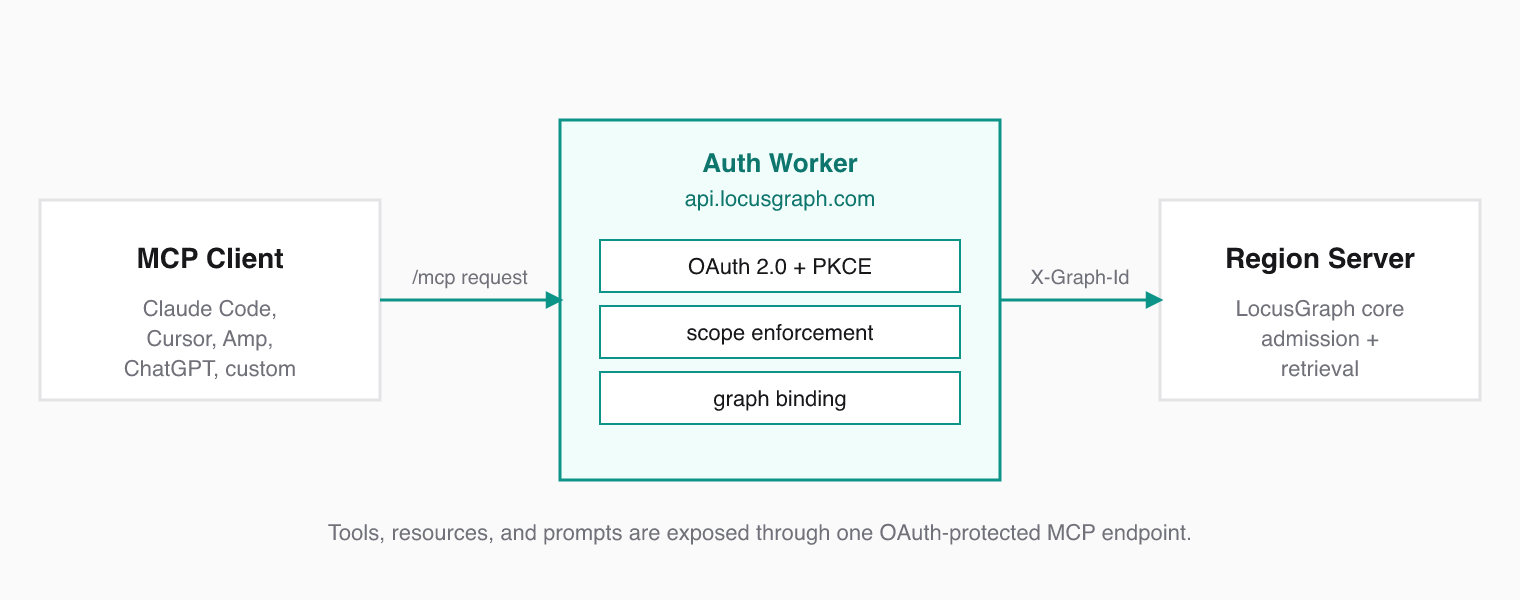
LocusGraph is LLM and IDE agnostic. The same Structured Agent Knowledge graph should be reachable from Claude Code, Cursor, Amp, ChatGPT apps, or any custom agent. MCP gives you that without writing a custom integration per client — and OAuth keeps the graph properly scoped per user and per workspace.
 ### What MCP Provides
Model Context Protocol standardizes how AI agents discover and call external tools. Instead of writing custom integrations for each agent framework, you expose a single MCP server. Any compatible client connects instantly.
MCP defines three primitives:
* **Tools** — functions the agent can call (store events, retrieve knowledge, generate insights)
* **Resources** — read-only data the agent can browse before calling tools
* **Prompts** — reusable prompt templates the client can fetch on demand
### What LocusGraph Exposes
LocusGraph serves MCP at the auth worker's `/mcp` endpoint. The auth worker handles OAuth, binds the issued token to a selected graph, and proxies MCP calls into the region server.
The backend currently exposes:
* Four tools: `store_event`, `retrieve_memories`, `list_contexts`, `generate_insights`
* One resource: `locusgraph://contexts`
* One prompt: `auto_capture`
Use MCP when your client supports remote HTTP MCP with OAuth 2.0. Use the SDKs when you want direct application-level control over how the agent reads and writes structured agent knowledge.
### How a Connection Works
1. Your MCP client connects to `https://api.locusgraph.com/mcp`.
2. The auth worker challenges the client with OAuth metadata from `/.well-known/oauth-protected-resource`.
3. The client discovers the authorization server at `/.well-known/oauth-authorization-server` and `/.well-known/openid-configuration`.
4. The user signs in, approves access, and selects a graph during `/oauth/authorize`.
5. The auth worker issues an OAuth token with scopes such as `profile`, `memory.read`, and `memory.write`.
6. Each authenticated MCP request is proxied to the region server with the selected graph injected via `X-Graph-Id`.
### Auth Endpoints
The auth worker exposes these MCP-related endpoints:
| Endpoint | Purpose |
| --------------------------------------------- | --------------------------------------------- |
| `POST /mcp` | Remote MCP endpoint |
| `GET /.well-known/oauth-protected-resource` | Protected resource metadata for `/mcp` |
| `GET /.well-known/oauth-authorization-server` | OAuth authorization server metadata |
| `GET /.well-known/openid-configuration` | OpenID configuration |
| `GET /oauth/authorize` | Authorization UI and graph selection |
| `POST /oauth/register` | Dynamic client registration |
| `POST /oauth/token` | Authorization code and refresh token exchange |
| `GET /oauth/userinfo` | User claims for issued access tokens |
The production auth host is `https://api.locusgraph.com`.
### Next
### What MCP Provides
Model Context Protocol standardizes how AI agents discover and call external tools. Instead of writing custom integrations for each agent framework, you expose a single MCP server. Any compatible client connects instantly.
MCP defines three primitives:
* **Tools** — functions the agent can call (store events, retrieve knowledge, generate insights)
* **Resources** — read-only data the agent can browse before calling tools
* **Prompts** — reusable prompt templates the client can fetch on demand
### What LocusGraph Exposes
LocusGraph serves MCP at the auth worker's `/mcp` endpoint. The auth worker handles OAuth, binds the issued token to a selected graph, and proxies MCP calls into the region server.
The backend currently exposes:
* Four tools: `store_event`, `retrieve_memories`, `list_contexts`, `generate_insights`
* One resource: `locusgraph://contexts`
* One prompt: `auto_capture`
Use MCP when your client supports remote HTTP MCP with OAuth 2.0. Use the SDKs when you want direct application-level control over how the agent reads and writes structured agent knowledge.
### How a Connection Works
1. Your MCP client connects to `https://api.locusgraph.com/mcp`.
2. The auth worker challenges the client with OAuth metadata from `/.well-known/oauth-protected-resource`.
3. The client discovers the authorization server at `/.well-known/oauth-authorization-server` and `/.well-known/openid-configuration`.
4. The user signs in, approves access, and selects a graph during `/oauth/authorize`.
5. The auth worker issues an OAuth token with scopes such as `profile`, `memory.read`, and `memory.write`.
6. Each authenticated MCP request is proxied to the region server with the selected graph injected via `X-Graph-Id`.
### Auth Endpoints
The auth worker exposes these MCP-related endpoints:
| Endpoint | Purpose |
| --------------------------------------------- | --------------------------------------------- |
| `POST /mcp` | Remote MCP endpoint |
| `GET /.well-known/oauth-protected-resource` | Protected resource metadata for `/mcp` |
| `GET /.well-known/oauth-authorization-server` | OAuth authorization server metadata |
| `GET /.well-known/openid-configuration` | OpenID configuration |
| `GET /oauth/authorize` | Authorization UI and graph selection |
| `POST /oauth/register` | Dynamic client registration |
| `POST /oauth/token` | Authorization code and refresh token exchange |
| `GET /oauth/userinfo` | User claims for issued access tokens |
The production auth host is `https://api.locusgraph.com`.
### Next
## MCP Resources
MCP resources expose read-only Structured Agent Knowledge for browsing without making tool calls. They are the "look around before you act" surface of the graph.
import { Callout } from '../../components/Callout.tsx'
import { LinkCard } from '../../components/link-card.tsx'
### What Are Resources?
Resources are read-only data endpoints that MCP clients can discover and read. Unlike tools, resources do not modify state. They let agents browse the graph structure before deciding what to query.
LocusGraph currently exposes one resource via `resources/list`.
### Available Resource
**URI:** `locusgraph://contexts`
This resource returns the contexts linked into the selected graph. Each item includes:
* `context_id`
* `reference_count`
### Example `resources/read`
```json
{
"jsonrpc": "2.0",
"id": 1,
"method": "resources/read",
"params": {
"uri": "locusgraph://contexts"
}
}
```
Resources are graph-scoped. The auth worker injects the selected graph into the proxied MCP request, so `resources/read` operates on the graph chosen during OAuth authorization.
### When to Use Resources vs. Tools
| Use Case | Approach |
| --------------------------------------------------- | ------------------------------------- |
| Browse what context IDs exist in the selected graph | Read resources |
| Search for specific knowledge | Call `retrieve_memories` tool |
| Store a new knowledge event | Call `store_event` tool |
| Explore before filtering tools | Read resources, then query with tools |
Resources are best for orientation. Tools are best for action.
### Prompts
The same MCP surface also exposes one prompt through `prompts/list` and `prompts/get`:
* `auto_capture` — a reusable prompt that instructs the client to store new knowledge immediately with `store_event`
### Next
## MCP Tools
LocusGraph currently exposes four MCP tools through the region server, with OAuth enforced at the auth worker's `/mcp` endpoint. Together they cover the full structured agent knowledge loop: write events, read knowledge, browse contexts, and reason over what the agent has learned.
import { Callout } from '../../components/Callout.tsx'
import { LinkCard } from '../../components/link-card.tsx'
### Scopes
OAuth scopes are enforced before the request reaches the graph:
| Tool | Required scopes |
| ------------------- | ----------------------------- |
| `retrieve_memories` | `memory.read` |
| `list_contexts` | `memory.read` |
| `store_event` | `memory.read`, `memory.write` |
| `generate_insights` | `memory.read`, `memory.write` |
The access token is also bound to the selected `graph_id`, and the auth worker forwards that graph to the region server via `X-Graph-Id`.
### store\_event
Writes a knowledge event into LocusGraph. The admission pipeline types it, scopes it, and turns it into a locus in your structured agent knowledge graph.
**Parameters:**
| Name | Required | Description |
| ------------- | -------- | ----------------------------------------------------------------------------------- |
| `event_kind` | Yes | Event kind: `fact`, `action`, `decision`, `observation`, `feedback` |
| `payload` | No | Memory payload. Recommended shape: `{ "data": { "topic": "...", "value": "..." } }` |
| `context_id` | No | Primary context in format `type:name` |
| `source` | No | Event source: `agent`, `user`, `system`, `validator`, `executor` |
| `reinforces` | No | Array of context IDs this event reinforces |
| `extends` | No | Array of context IDs this event extends |
| `contradicts` | No | Array of context IDs this event contradicts |
| `related_to` | No | Array of related context IDs |
| `timestamp` | No | Unix timestamp as string |
Aliases accepted by the backend:
* `context_id`: also accepts `event_id`
* `event_kind`: also accepts `event_type` and `eventType`
* `payload`: also accepts `content`
```json
{
"tool": "store_event",
"arguments": {
"context_id": "skill:react_hooks",
"event_kind": "fact",
"source": "agent",
"payload": {
"topic": "useEffect cleanup", "value": "Always return a cleanup function when subscribing to external stores"
}
}
}
```
### retrieve\_memories
Searches LocusGraph using semantic similarity and returns validated knowledge ranked by relevance and confidence.
**Parameters:**
| Name | Required | Description |
| --------------- | -------- | ------------------------------------------------- |
| `query` | Yes | Search query string |
| `limit` | No | Maximum number of results |
| `context_ids` | No | Filter by specific context IDs |
| `context_types` | No | Filter by context types (map of type to names) |
| `include_ids` | No | Include locus IDs and context IDs in the response |
```json
{
"tool": "retrieve_memories",
"arguments": {
"query": "React hook best practices",
"limit": 5,
"context_types": { "skill": ["react_hooks"] }
}
}
```
### list\_contexts
Lists available context IDs with optional filtering and pagination.
**Parameters:**
| Name | Required | Description |
| -------------- | -------- | ----------------------------- |
| `context_type` | No | Filter by context type |
| `context_name` | No | Filter by context name |
| `limit` | No | Max results. Default: `100` |
| `page` | No | Pagination page. Default: `0` |
```json
{
"tool": "list_contexts",
"arguments": {
"context_type": "skill",
"limit": 10
}
}
```
### generate\_insights
Reasons over your structured agent knowledge to surface patterns and recommendations for a given task.
**Parameters:**
| Name | Required | Description |
| --------------- | -------- | --------------------------------------------- |
| `task` | Yes | Task description for insight generation |
| `locus_query` | No | Query for searching relevant knowledge |
| `limit` | No | Maximum number of knowledge items to retrieve |
| `context_ids` | No | Filter by specific context IDs |
| `context_types` | No | Filter by context types |
The backend also accepts `context_query` as an alias for `locus_query`.
```json
{
"tool": "generate_insights",
"arguments": {
"task": "Refactor the authentication module",
"locus_query": "authentication patterns and past errors",
"limit": 10,
"context_types": { "error": [], "skill": [] }
}
}
```
`tools/list` is discoverable over MCP, but `tools/call` uses OAuth access tokens issued by the auth worker, not direct `LOCUSGRAPH_AGENT_SECRET` configuration.
### Next
import { Callout } from '../../components/Callout.tsx'
import { LinkCard } from '../../components/link-card.tsx'
import { CodeGroup } from '../../components/code-group.tsx'
## LangChain Integration
Connect Structured Agent Knowledge to LangChain agents with `LocusGraphMemory` and `LocusGraphRetriever`. Both adapters are LLM agnostic — you can swap models without losing the knowledge graph behind them.
### Installation
```bash {{ title: "TypeScript" }}
npm install @locusgraph/client @langchain/core langchain
```
```bash {{ title: "Python" }}
pip install locusgraph-client[langchain]
```
### LocusGraphMemory
`LocusGraphMemory` gives LangChain chains access to your structured agent knowledge as conversational context. It stores conversation events automatically and retrieves validated knowledge on each turn.
#### TypeScript
```typescript
import { LocusGraphClient, LocusGraphMemory } from '@locusgraph/client';
import { ConversationChain } from 'langchain/chains';
import { ChatOpenAI } from '@langchain/openai';
const client = new LocusGraphClient({
agentSecret: process.env.LOCUSGRAPH_AGENT_SECRET,
});
const memory = new LocusGraphMemory(
client,
'default', // graphId
'my-agent', // agentId
'session-123', // sessionId
);
const chain = new ConversationChain({
llm: new ChatOpenAI(),
memory,
});
const response = await chain.call({ input: 'What do you know about my preferences?' });
```
#### Python
```python
from locusgraph_client import LocusGraphClient, LocusGraphMemory
from langchain.chains import ConversationChain
from langchain_openai import ChatOpenAI
client = LocusGraphClient(agent_secret="your-secret")
memory = LocusGraphMemory(
client,
"default", # graph_id
agent_id="my-agent",
session_id="session-123",
)
chain = ConversationChain(llm=ChatOpenAI(), memory=memory)
response = chain.invoke({"input": "What do you know about my preferences?"})
```
#### Memory Keys
`LocusGraphMemory` exposes three keys to your chain's prompt:
| Key | Description |
| ------------- | -------------------------------------------------- |
| `history` | Recent conversation turns from the current session |
| `memories` | Validated knowledge retrieved from LocusGraph |
| `memory_info` | Metadata about retrieved contexts (scores, types) |
#### Automatic Event Classification
When `LocusGraphMemory` stores conversation events, it classifies them automatically:
| Classification | Trigger |
| -------------- | ----------------------------------------------------------------- |
| `fact` | User states preferences, personal details, or factual information |
| `action` | User requests a task or the agent performs one |
| `decision` | User makes a choice between alternatives |
| `feedback` | User expresses opinions or satisfaction |
| `observation` | Default for all other conversational content |
### LocusGraphRetriever
`LocusGraphRetriever` implements LangChain's retriever interface, letting you plug your structured agent knowledge into any retrieval chain.
#### TypeScript
```typescript
import { LocusGraphClient, LocusGraphRetriever } from '@locusgraph/client';
import { RetrievalQAChain } from 'langchain/chains';
import { ChatOpenAI } from '@langchain/openai';
const client = new LocusGraphClient({
agentSecret: process.env.LOCUSGRAPH_AGENT_SECRET,
});
const retriever = new LocusGraphRetriever({
client,
graphId: 'default',
limit: 10,
});
const chain = RetrievalQAChain.fromLLM(new ChatOpenAI(), retriever);
const response = await chain.call({ query: 'Summarize user preferences' });
```
#### Python
```python
from locusgraph_client import LocusGraphClient, LocusGraphRetriever
from langchain.chains import RetrievalQA
from langchain_openai import ChatOpenAI
client = LocusGraphClient(agent_secret="your-secret")
retriever = LocusGraphRetriever(
client=client,
graph_id="default",
limit=10,
)
chain = RetrievalQA.from_llm(llm=ChatOpenAI(), retriever=retriever)
response = chain.invoke({"query": "Summarize user preferences"})
```
`LocusGraphRetriever` returns LangChain `Document` objects. Each document's `page_content` holds the context content, and `metadata` includes `context_id`, `context_type`, and `score`.
### Next
## Common Patterns
Proven patterns for turning agent experience into structured agent knowledge with LocusGraph.
import { Callout } from '../../components/Callout.tsx'
import { LinkCard } from '../../components/link-card.tsx'
### The Graduation Chain
The defining pattern in LocusGraph is the graduation chain: events become patterns, and patterns become skills. Confidence scoring decides what graduates and what fades.
**Step 1: Store the event.** When the agent makes an error, record it as an observation under an `error:` context.
```typescript
await client.storeEvent({
graph_id: 'default',
event_kind: 'observation',
source: 'agent',
context_id: 'error:off_by_one',
payload: { topic: 'off_by_one', value: 'Array index out of bounds in pagination logic' },
});
```
**Step 2: Recognize the pattern.** When the same error appears 3+ times, store a pattern that links back to the error context with `reinforces`.
```typescript
await client.storeEvent({
graph_id: 'default',
event_kind: 'fact',
source: 'agent',
context_id: 'pattern:pagination_bounds',
reinforces: ['error:off_by_one'],
payload: { topic: 'pagination_bounds', value: 'Always use length - 1 for zero-indexed arrays' },
});
```
**Step 3: Graduate to skill.** After the pattern proves useful 5+ times, promote it to a skill with `extends`.
```typescript
await client.storeEvent({
graph_id: 'default',
event_kind: 'fact',
source: 'agent',
context_id: 'skill:safe_pagination',
extends: ['pattern:pagination_bounds'],
payload: { topic: 'safe_pagination', value: 'Clamp page index between 0 and Math.ceil(total/pageSize) - 1' },
});
```
The graduation chain is what makes LocusGraph more than memory. Skills retrieved during future sessions prevent the same mistakes from recurring.
### Preference Tracking
Store user preferences as facts. When the same preference surfaces again, use `reinforces` to link back to the original. Confidence rises and the preference ranks higher in retrieval — exactly the kind of validated knowledge that should sit at the front.
### Session Bookends
Bracket each session with a start event and an end event. Tag all events within the session using a consistent `session:` context prefix (e.g., `session:2024-03-15-abc`). This makes it easy to retrieve everything that happened in a given session and to track how the agent's knowledge evolved over time.
### Next
## Environment Variables
Every configuration option available for LocusGraph SDKs. Two variables are enough to point any SDK at your Structured Agent Knowledge graph.
import { Callout } from '../../components/Callout.tsx'
import { LinkCard } from '../../components/link-card.tsx'
### Reference
| Variable | Required | Default | Description |
| ------------------------- | -------- | ---------------------------- | -------------------------- |
| `LOCUSGRAPH_SERVER_URL` | No | `https://api.locusgraph.com` | API server URL |
| `LOCUSGRAPH_AGENT_SECRET` | Yes | — | Agent authentication token |
### Setting Environment Variables
Create a `.env` file in your project root:
```bash
# .env file
LOCUSGRAPH_SERVER_URL=https://api.locusgraph.com
LOCUSGRAPH_AGENT_SECRET=your-agent-secret
```
Never commit `LOCUSGRAPH_AGENT_SECRET` to version control. Add `.env` to your `.gitignore` immediately.
### Per-Language Usage
**TypeScript** reads from environment automatically, or accepts explicit config:
```typescript
const client = new LocusGraphClient({
serverUrl: process.env.LOCUSGRAPH_SERVER_URL,
agentSecret: process.env.LOCUSGRAPH_AGENT_SECRET,
});
```
**Python** reads from environment automatically, or accepts constructor arguments:
```python
client = LocusGraphClient(
server_url=os.environ.get("LOCUSGRAPH_SERVER_URL"),
agent_secret=os.environ.get("LOCUSGRAPH_AGENT_SECRET"),
)
```
**Rust** reads from environment automatically, or accepts config:
```rust
let client = LocusGraphClient::new(None); // reads from env
```
All three SDKs follow the same priority: explicit config overrides environment variables, which override defaults. If you pass `None` or omit a field, the SDK falls back to the environment variable. If that is unset, it uses the default (for `LOCUSGRAPH_SERVER_URL`) or returns an error (for `LOCUSGRAPH_AGENT_SECRET`).
### Next
## Error Handling
What breaks, why it breaks, and how to handle it across every SDK. Treat each error as data: many of these failures are exactly the kind of event your agent should store back into LocusGraph so it stops repeating them.
import { Callout } from '../../components/Callout.tsx'
import { LinkCard } from '../../components/link-card.tsx'
import { CodeGroup } from '../../components/code-group.tsx'
### Common Errors
| Status | Meaning | Typical Cause |
| ---------------- | ----------------- | ------------------------------------------------------------------------------------------------- |
| 400 Bad Request | Invalid input | Bad `event_kind`, payload over 256KB, too many link IDs (>100 total), invalid `context_id` format |
| 401 Unauthorized | Auth failure | Missing or invalid `LOCUSGRAPH_AGENT_SECRET` |
| 404 Not Found | Resource missing | Context doesn't exist (when calling `getContext`) |
| 429 Rate Limited | Too many requests | Slow down or batch your calls |
The most common mistake: forgetting to set `LOCUSGRAPH_AGENT_SECRET`. Every SDK call will return 401 until it is configured.
### Handling Errors by Language
**TypeScript:**
```typescript
try {
await client.storeEvent({ ... });
} catch (error) {
if (error instanceof Error) {
console.error('Store failed:', error.message);
}
}
```
**Python:**
```python
try:
client.store_event({...})
except RuntimeError as e:
print(f"Store failed: {e}")
```
**Rust:**
```rust
match client.store_event(request) {
Ok(response) => println!("Stored: {}", response.event_id),
Err(e) => eprintln!("Store failed: {}", e),
}
```
### Validation Constraints
Stay within these limits to avoid 400 errors:
| Constraint | Limit |
| ------------------------------------------------------ | -------------- |
| Event kind max length | 128 characters |
| Context ID max length | 256 characters |
| Link IDs per field (`reinforces`, `contradicts`, etc.) | 50 |
| Total link IDs across all fields | 100 |
| Payload max size | 256KB |
| Batch events max | 100 per call |
If you hit 429 rate limits, switch to batch event storage. One batch call with 50 events is better than 50 individual calls.
### Next
## Authentication
Every request to LocusGraph requires an agent secret passed as a Bearer token. The secret identifies which agent is reading and writing your Structured Agent Knowledge graph, so treat it like any other production credential.
import { Callout } from '../../components/Callout.tsx'
import { Steps, Step } from '../../components/step.tsx'
import { CodeGroup } from '../../components/code-group.tsx'
import { LinkCard } from '../../components/link-card.tsx'
import { Badge } from '../../components/badge.tsx'
### Get Your Agent Secret
Go to [dashboard.locusgraph.com](https://dashboard.locusgraph.com) and sign in.
Navigate to **Agents** and either create a new agent or select an existing one.
Click **Reveal Secret** and copy the value. You will only see it once.
Never commit agent secrets to source control. Use environment variables or a secrets manager. Rotate secrets immediately if exposed.
### Environment Variables
Set these two variables in your environment:
| Variable | Required | Default |
| ------------------------- | ------------------------------------------ | ---------------------------- |
| `LOCUSGRAPH_AGENT_SECRET` | required | — |
| `LOCUSGRAPH_SERVER_URL` | optional | `https://api.locusgraph.com` |
```bash
export LOCUSGRAPH_AGENT_SECRET="your-agent-secret"
export LOCUSGRAPH_SERVER_URL="https://api.locusgraph.com"
```
```powershell
$env:LOCUSGRAPH_AGENT_SECRET = "your-agent-secret"
$env:LOCUSGRAPH_SERVER_URL = "https://api.locusgraph.com"
```
```bash
LOCUSGRAPH_AGENT_SECRET=your-agent-secret
LOCUSGRAPH_SERVER_URL=https://api.locusgraph.com
```
### Bearer Token Format
All API requests use the `Authorization` header:
```
Authorization: Bearer
```
The SDKs handle this automatically when you pass the secret during client initialization. For raw HTTP calls, include the header manually:
```bash
curl -H "Authorization: Bearer $LOCUSGRAPH_AGENT_SECRET" \
https://api.locusgraph.com/v1/memories
```
### Next
## Introduction
import { LinkCard } from '../../components/link-card.tsx'
import { Callout } from '../../components/Callout.tsx'
LocusGraph turns what your agents learn into structured knowledge that compounds, so events become patterns, patterns become skills, and every session starts smarter.
It is the **Structured Agent Knowledge** layer that sits between your agent and its LLM.
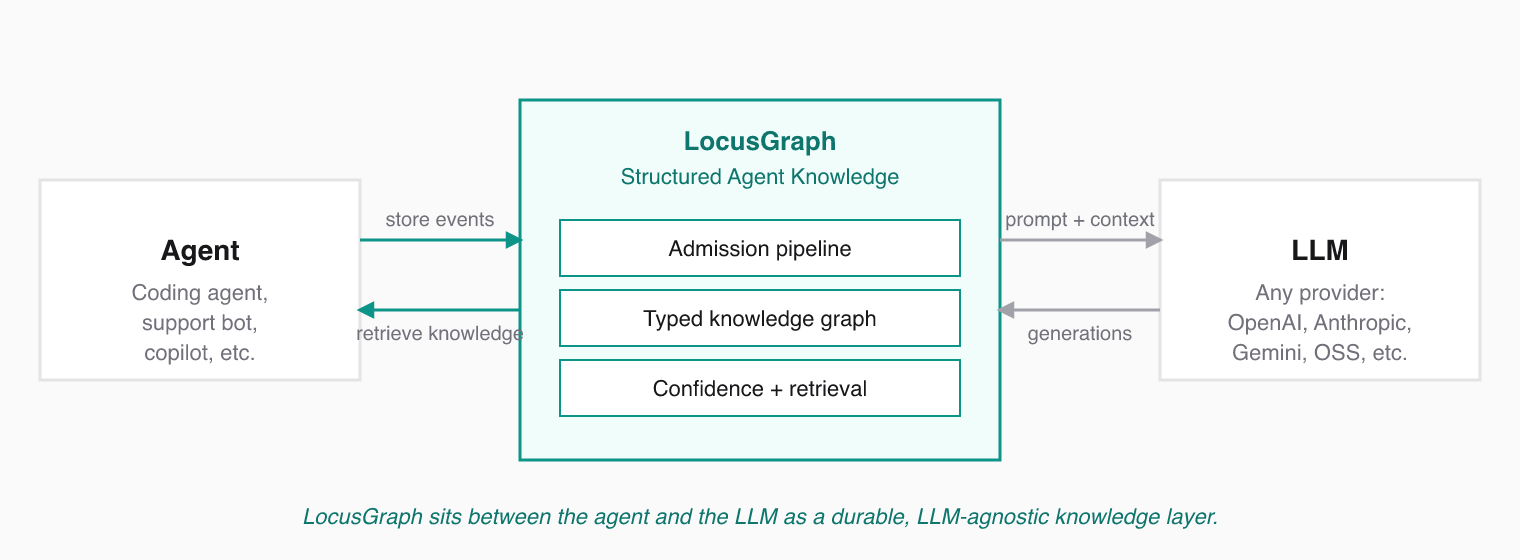 ### The 10-Second Pitch
Agents usually forget everything between sessions. LocusGraph fixes that without dumping chat logs into a vector database. We turn agent experiences into a structured knowledge graph where events evolve into patterns, patterns develop into skills, and confidence scoring ensures only validated knowledge is brought to the forefront. Your agent does not just remember. It becomes wiser.
### The Category: Structured Agent Knowledge
* **Structured** separates LocusGraph from dump-everything vector stores.
* **Agent** says exactly who it is for.
* **Knowledge** is a step above memory. Memory is recall. Knowledge is understanding.
### Read in Order
The Foundations section walks through the full positioning narrative — nine focused pages, one per idea.
### The 10-Second Pitch
Agents usually forget everything between sessions. LocusGraph fixes that without dumping chat logs into a vector database. We turn agent experiences into a structured knowledge graph where events evolve into patterns, patterns develop into skills, and confidence scoring ensures only validated knowledge is brought to the forefront. Your agent does not just remember. It becomes wiser.
### The Category: Structured Agent Knowledge
* **Structured** separates LocusGraph from dump-everything vector stores.
* **Agent** says exactly who it is for.
* **Knowledge** is a step above memory. Memory is recall. Knowledge is understanding.
### Read in Order
The Foundations section walks through the full positioning narrative — nine focused pages, one per idea.
### Or Skip Straight to Building
LocusGraph is LLM agnostic. The knowledge layer lives outside the model so the same agent knowledge survives model swaps, agent rewrites, and IDE changes.
## Quickstart
Get LocusGraph running in under five minutes: install, store a knowledge event, retrieve it.
import { Steps, Step } from '../../components/step.tsx'
import { CodeGroup } from '../../components/code-group.tsx'
import { Callout } from '../../components/Callout.tsx'
import { LinkCard } from '../../components/link-card.tsx'
### Prerequisites
You need an agent secret from the [LocusGraph dashboard](https://dashboard.locusgraph.com). See [Authentication](/getting-started/authentication) if you do not have one yet.
### Install
```bash
npm install @locusgraph/client
```
```bash
pip install locusgraph-client
```
```bash
cargo add locusgraph-client
```
```typescript
import { LocusGraphClient } from '@locusgraph/client';
const client = new LocusGraphClient({
agentSecret: process.env.LOCUSGRAPH_AGENT_SECRET,
graphId: 'default',
});
```
```python
from locusgraph_client import LocusGraphClient
client = LocusGraphClient(agent_secret="your-agent-secret")
```
Send an event to LocusGraph. The admission pipeline types it, scopes it, and turns it into a node in your structured agent knowledge graph.
```typescript
await client.storeEvent({
graph_id: 'default',
event_kind: 'fact',
source: 'agent',
payload: { topic: 'user_preference', value: 'dark mode' },
});
```
```python
client.store_event({
"graph_id": "default",
"event_kind": "fact",
"source": "agent",
"payload": {"topic": "user_preference", "value": "dark mode"},
})
```
Query the graph to pull back the most relevant knowledge for the current task.
```typescript
const result = await client.retrieveMemories({
query: 'user preferences',
limit: 5,
});
console.log(result);
```
```python
context = client.retrieve_memories(
query="user preferences",
graph_id="default",
limit=5,
)
print(context)
```
Start with `fact` for stable knowledge. Reach for `action`, `decision`, `observation`, and `feedback` as your agent learns more nuanced experience.
### Next
## 2. What is Agent Structured Knowledge?
import { LinkCard } from '../../components/link-card.tsx'
import { Callout } from '../../components/Callout.tsx'
Agent Structured Knowledge is the durable layer of what an agent has learned from work it has actually performed. It is not a transcript, scratchpad, or pile of embeddings. It is knowledge with shape.
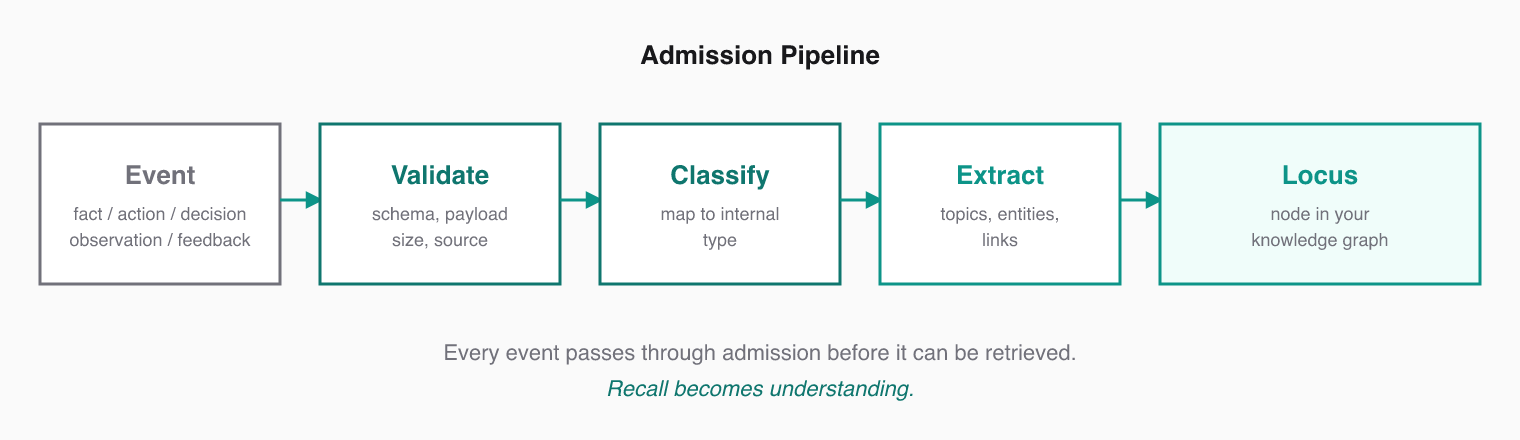 ### The Anatomy of a Learning
Every event admitted into LocusGraph carries:
* the **event kind**, such as `decision`, `observation`, or `feedback`
* the **source**, such as `agent`, `user`, `system`, `validator`, or `executor`
* the **payload** that captures the actual learning
* the **context** that scopes where the knowledge applies
* the **links** to knowledge it reinforces, contradicts, extends, or relates to
* the **confidence score** that changes as evidence accumulates
That shape is what lets the agent retrieve validated knowledge, not just similar text.
### Why "Structured" Matters
A plain memory system stores text and retrieves text that looks similar. Agent Structured Knowledge does more:
| Concern | Plain memory | Agent Structured Knowledge |
| ------- | -------------------------- | ---------------------------------------------------- |
| Format | Free text or embeddings | Typed events with payload, source, links |
| Decay | Stale items stay forever | Contradictions lower confidence; bad knowledge fades |
| Reuse | Re-explained every session | Compounds across sessions |
| Trust | All snippets equal | User and validator sources weight higher |
| Output | Similar snippets | Validated knowledge for the current task |
### The Knowledge Compounds
Repeating an experience does not bloat the graph — it strengthens it. Two events linked with `reinforces` carry more confidence than either alone. A new event that `contradicts` an old one quietly demotes the old one in retrieval. This is how memory becomes knowledge.
Agent Structured Knowledge is what graduates. A single event is data. A reinforced cluster is a pattern. A repeatedly validated pattern is a skill.
### Next
### The Anatomy of a Learning
Every event admitted into LocusGraph carries:
* the **event kind**, such as `decision`, `observation`, or `feedback`
* the **source**, such as `agent`, `user`, `system`, `validator`, or `executor`
* the **payload** that captures the actual learning
* the **context** that scopes where the knowledge applies
* the **links** to knowledge it reinforces, contradicts, extends, or relates to
* the **confidence score** that changes as evidence accumulates
That shape is what lets the agent retrieve validated knowledge, not just similar text.
### Why "Structured" Matters
A plain memory system stores text and retrieves text that looks similar. Agent Structured Knowledge does more:
| Concern | Plain memory | Agent Structured Knowledge |
| ------- | -------------------------- | ---------------------------------------------------- |
| Format | Free text or embeddings | Typed events with payload, source, links |
| Decay | Stale items stay forever | Contradictions lower confidence; bad knowledge fades |
| Reuse | Re-explained every session | Compounds across sessions |
| Trust | All snippets equal | User and validator sources weight higher |
| Output | Similar snippets | Validated knowledge for the current task |
### The Knowledge Compounds
Repeating an experience does not bloat the graph — it strengthens it. Two events linked with `reinforces` carry more confidence than either alone. A new event that `contradicts` an old one quietly demotes the old one in retrieval. This is how memory becomes knowledge.
Agent Structured Knowledge is what graduates. A single event is data. A reinforced cluster is a pattern. A repeatedly validated pattern is a skill.
### Next
## 9. Context Engineering Misconceptions and LocusGraph's Role
import { LinkCard } from '../../components/link-card.tsx'
import { Callout } from '../../components/Callout.tsx'
Context engineering is a discipline, not a product category. Saying "we do context engineering" is like saying "we do software engineering" — true, but not specific enough to explain what someone should buy.
### Three Misconceptions to Avoid
#### 1. "Context engineering" is a product
It is not. It is a discipline that describes how teams design what an agent stores and retrieves. Vendors that market "context engineering" without naming what they actually deliver are describing the work, not the tool.
#### 2. "Agent memory" is enough
Calling LocusGraph "agent memory" undersells the product. Agent memory usually means storing and retrieving past text. LocusGraph does something more: it turns agent experience into typed, linked, scored knowledge that self-organizes over time.
Memory is recall. Knowledge is understanding.
#### 3. The problem is "agents forget"
The well-known problem is that agents forget. The deeper mechanism is that **agent knowledge does not evolve**. Even with infinite memory, an agent that cannot graduate events into patterns and patterns into skills is just an agent with a longer chat log.
### Where LocusGraph Plays an Active Role
LocusGraph is not a generic context-engineering toolkit. It plays specific, structural roles:
| Stage | What LocusGraph does |
| -------- | ------------------------------------------------------------------ |
| Capture | Admits typed events with source, payload, links, and confidence |
| Organize | Scopes knowledge by context, type, and graph |
| Score | Updates confidence with every `reinforces` and `contradicts` link |
| Retrieve | Filters, ranks, and re-ranks so validated knowledge surfaces first |
| Graduate | Promotes events into patterns and patterns into skills |
These are the moves that make context engineering actually compound for an agent over time.
### The Active Role, Concretely
| Without LocusGraph | With LocusGraph |
| -------------------------------------------------- | ------------------------------------------------------ |
| You decide what to dump into the prompt every turn | The graph admits, scores, and retrieves on your behalf |
| Stale knowledge sticks around forever | Contradictions automatically demote it |
| Re-explain the same thing to a new model | The same graph works behind any LLM |
| Skills exist only in the developer's head | Skills exist as queryable graph nodes |
Context engineering is iterative. Start with simple schemas, observe what your agent retrieves, and refine. LocusGraph's confidence scoring helps surface what works and suppress what does not.
### What This Means for Your Stack
You still own the policy:
* which contexts your agent uses
* how it links events
* when it graduates patterns into skills
* how it scopes retrieval per task
LocusGraph provides the **mechanics** — admission, scoring, graduation, retrieval — so the policy you design actually compounds instead of decaying.
### Where to Go Next
## 6. How LocusGraph Gives Your Agent Evolving Skills
import { LinkCard } from '../../components/link-card.tsx'
import { Callout } from '../../components/Callout.tsx'
LocusGraph gives agents a way to actually learn from repeated work. Not "remember more" — *learn*.
### The Mechanism
When an agent makes the same mistake across sessions, LocusGraph preserves it as a mistake pattern. When the agent repeats a successful approach, LocusGraph reinforces it. When that approach keeps working, it graduates into a reusable skill.
```text
single correction -> repeated pattern -> durable skill
```
The next time the agent faces a similar task, it retrieves the skill instead of rebuilding the same reasoning from scratch. That is what "starts smarter every session" actually means in practice.
### The Loop, Concretely
1. **Observe** the world or user input.
2. **Store** typed events in LocusGraph.
3. **Retrieve** validated knowledge before acting.
4. **Act** with that knowledge in hand.
5. **Learn** — links update confidence, events graduate into skills.
Run that loop every session. The graph compounds.
### What Counts as a "Skill"
A skill in LocusGraph is just a context like `skill:` that holds a graduated learning. It typically:
* references the patterns it generalizes (`extends` links)
* carries higher confidence than raw events
* gets surfaced first by retrieval when the agent queries the relevant area
Skills are not magic — they are graph nodes that earned their position through reinforcement.
### Example: A Coding Agent's Skill Evolution
| Session | What happens | What gets stored |
| ------- | ----------------------------------------- | ------------------------------------------------------------------------ |
| 1 | Agent writes off-by-one bug in pagination | `observation` under `error:off_by_one` |
| 2 | Same bug recurs | second `observation`, with `reinforces` to the first |
| 3 | Same bug a third time | `fact` under `pattern:pagination_bounds`, `reinforces` the error context |
| 4–5 | Pattern works to prevent the bug | additional `reinforces` links |
| 6 | Pattern proven | `decision` under `skill:safe_pagination`, `extends` the pattern |
By session 7, retrieving on "pagination" surfaces the skill — not a wall of error reports.
Skills are how token usage stays small as the agent gets wiser. The agent retrieves one validated `skill:` node instead of replaying the history of mistakes that produced it.
### Next
## 3. The Graduation Plane
import { LinkCard } from '../../components/link-card.tsx'
import { Callout } from '../../components/Callout.tsx'
The core differentiator in LocusGraph is **graduation**. Events do not just get stored — they get admitted, linked, scored, and promoted up a four-stage plane.
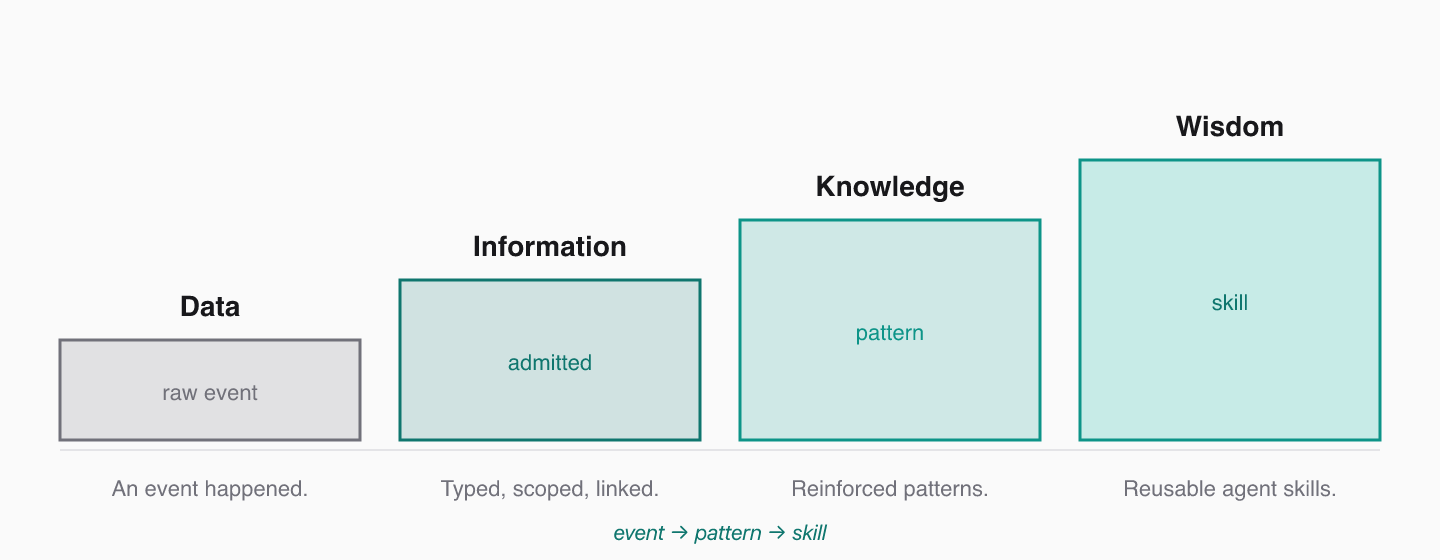 ### The Four Stages
| Stage | What it means in LocusGraph |
| --------------- | ---------------------------------------------------------------------------------- |
| **Data** | A raw event happened: an error, action, decision, observation, or user correction. |
| **Information** | The event is admitted, typed, scoped, and connected to a context. |
| **Knowledge** | Repeated evidence turns isolated events into patterns with rising confidence. |
| **Wisdom** | Validated patterns graduate into skills the agent can reuse in future work. |
The compact version:
```text
event -> pattern -> skill
```
### How Graduation Works
A fact reinforced five times rises in confidence. A fact contradicted drops. A repeated failure becomes a mistake to avoid. A repeated successful workflow graduates into a skill.
This is automatic. You do not have to manage it manually:
1. **Admit events** with the right kind, source, and payload.
2. **Link** new events to existing ones with `reinforces`, `contradicts`, `extends`, or `derived_from`.
3. **Confidence scoring** updates the graph in place.
4. **Retrieval** ranks well-validated knowledge to the front.
Patterns and skills are queryable as their own contexts (e.g. `pattern:pagination_bounds`, `skill:safe_pagination`), so the agent can ask for "the skill for X" instead of replaying the entire history of mistakes that led there.
### The Plane in a Coding Agent
| Plane stage | Concrete example |
| ----------- | ---------------------------------------------------------------------------------------- |
| Data | "Index out of bounds in pagination logic." |
| Information | Admitted as an `observation` under `error:off_by_one`. |
| Knowledge | After 3 hits, a `fact` under `pattern:pagination_bounds` reinforces the pattern. |
| Wisdom | After 5 successful uses, a `decision` under `skill:safe_pagination` extends the pattern. |
The graduation plane is what makes LocusGraph more than memory. Skills retrieved during future sessions prevent the same mistakes from recurring.
### Next
### The Four Stages
| Stage | What it means in LocusGraph |
| --------------- | ---------------------------------------------------------------------------------- |
| **Data** | A raw event happened: an error, action, decision, observation, or user correction. |
| **Information** | The event is admitted, typed, scoped, and connected to a context. |
| **Knowledge** | Repeated evidence turns isolated events into patterns with rising confidence. |
| **Wisdom** | Validated patterns graduate into skills the agent can reuse in future work. |
The compact version:
```text
event -> pattern -> skill
```
### How Graduation Works
A fact reinforced five times rises in confidence. A fact contradicted drops. A repeated failure becomes a mistake to avoid. A repeated successful workflow graduates into a skill.
This is automatic. You do not have to manage it manually:
1. **Admit events** with the right kind, source, and payload.
2. **Link** new events to existing ones with `reinforces`, `contradicts`, `extends`, or `derived_from`.
3. **Confidence scoring** updates the graph in place.
4. **Retrieval** ranks well-validated knowledge to the front.
Patterns and skills are queryable as their own contexts (e.g. `pattern:pagination_bounds`, `skill:safe_pagination`), so the agent can ask for "the skill for X" instead of replaying the entire history of mistakes that led there.
### The Plane in a Coding Agent
| Plane stage | Concrete example |
| ----------- | ---------------------------------------------------------------------------------------- |
| Data | "Index out of bounds in pagination logic." |
| Information | Admitted as an `observation` under `error:off_by_one`. |
| Knowledge | After 3 hits, a `fact` under `pattern:pagination_bounds` reinforces the pattern. |
| Wisdom | After 5 successful uses, a `decision` under `skill:safe_pagination` extends the pattern. |
The graduation plane is what makes LocusGraph more than memory. Skills retrieved during future sessions prevent the same mistakes from recurring.
### Next
## 4. LLM Agnostic
import { LinkCard } from '../../components/link-card.tsx'
import { Callout } from '../../components/Callout.tsx'
LocusGraph is LLM agnostic because the knowledge layer lives outside the model. The same Structured Agent Knowledge can be used with different LLMs, IDEs, agents, and orchestration frameworks without locking your knowledge to one provider.
### What Stays the Same When You Swap Models
The model can change. The agent framework can change. The IDE can change. The knowledge graph stays the durable layer that carries forward what your agent has learned.
| Layer | Often changes | LocusGraph behavior |
| -------------------------- | ------------- | -------------------------------------------------------- |
| LLM provider | Yes | Unaffected — knowledge does not live in the model. |
| Agent framework | Yes | Unaffected — graph is reachable from any framework. |
| IDE / client | Yes | Unaffected — same graph reachable over MCP. |
| Vector index | Yes | Unaffected — semantic retrieval lives inside LocusGraph. |
| Structured Agent Knowledge | No | Persists across all of the above. |
### How That's Achieved
LocusGraph exposes its operations through:
* A **typed HTTP API** that any backend can hit.
* **SDKs** in TypeScript, Python, and Rust for direct application use.
* An **MCP endpoint** for any compatible client (Claude Code, Cursor, Amp, ChatGPT, custom).
* **Integrations** like LangChain that adapt the graph to popular agent frameworks.
The same graph is reachable from all of them. A skill stored from your TypeScript backend is retrievable from Claude Code in the same project, because they both bind to the same `graph_id`.
LLM agnostic also means provider-cost agnostic. As pricing or capability shifts across models, you can switch without retraining or re-ingesting your accumulated agent knowledge.
### Why This Compounds
Agent setups change every few months. Models get faster, cheaper, or more capable. Frameworks rise and fall. The teams that move fastest are the ones whose knowledge layer is not locked to any of those moving parts. LocusGraph is designed to be that durable substrate.
### Next
## 7. Own Your IP as a Skill
import { LinkCard } from '../../components/link-card.tsx'
import { Callout } from '../../components/Callout.tsx'
The way your team solves problems is intellectual property. Your debugging habits, architectural preferences, review standards, deployment patterns, customer context, and hard-won corrections should not live only inside one model session.
### What "Operational IP" Looks Like
Most engineering teams already have implicit IP that an LLM cannot guess:
* the conventions you actually use, not the ones in your README
* the bugs that keep recurring in this codebase, and the fixes that worked
* the architectural decisions you made and *why*
* customer-specific context that took months of meetings to learn
* the review standards that aren't written down anywhere
In a typical AI IDE workflow, that knowledge lives only inside the current chat. When the session ends, it's gone. When the model changes, it has to be re-explained from scratch.
### How LocusGraph Captures It
As agents work with your codebase, customers, tools, and workflows, LocusGraph captures their experience as typed, linked, scored events. Repeated learnings graduate into skills, which become a layer of operational knowledge your team owns.
| What you stored | What it becomes |
| ---------------------------------------------- | ------------------------ |
| Recurring corrections during code review | `skill:review_standards` |
| Repeated architectural decisions | `skill:architecture` |
| Customer-specific quirks the agent rediscovers | `skill:customer_` |
| Debugging steps that worked | `skill:debug_` |
| Deployment patterns that succeeded | `skill:deploy_` |
The skills are queryable, retrievable, and durable across model swaps, agent rewrites, and IDE changes.
### Why This Matters as IP
| Property | Plain LLM workflow | LocusGraph |
| ---------------------- | ----------------------------- | --------------------------------------- |
| Survives model upgrade | No — context is in the prompt | Yes — knowledge lives outside the model |
| Survives agent rewrite | No | Yes |
| Survives IDE switch | No | Yes — same graph reachable over MCP |
| Owned by | Your prompt history | Your team |
| Compounds | No | Yes |
The result is not just an agent that remembers more. It is an agent that carries your team's accumulated judgment into future work.
### Practical Setup
A typical team layout:
* **One graph per project** for isolation.
* **Multi-agent contexts** (`agent:planner`, `agent:coder`, `agent:reviewer`) so each role's contributions are traceable.
* **Skill contexts** (`skill:*`) for graduated learnings.
* **Customer / project contexts** (`project:*`, `customer:*`) for domain-specific knowledge.
Every agent your team runs reads and writes the same graph. The IP compounds.
### Next
## 8. Tokens in Current IDEs vs LocusGraph
import { LinkCard } from '../../components/link-card.tsx'
import { Callout } from '../../components/Callout.tsx'
In current AI IDE workflows, tokens are spent stuffing the prompt with chat history, file excerpts, tool results, summaries, and vector-retrieved snippets. It works for the current turn but it is expensive and temporary. The same context has to be reintroduced again later.
With LocusGraph, long-term learning moves out of the prompt and into a structured knowledge graph. The agent retrieves compact, validated knowledge only when it needs it.
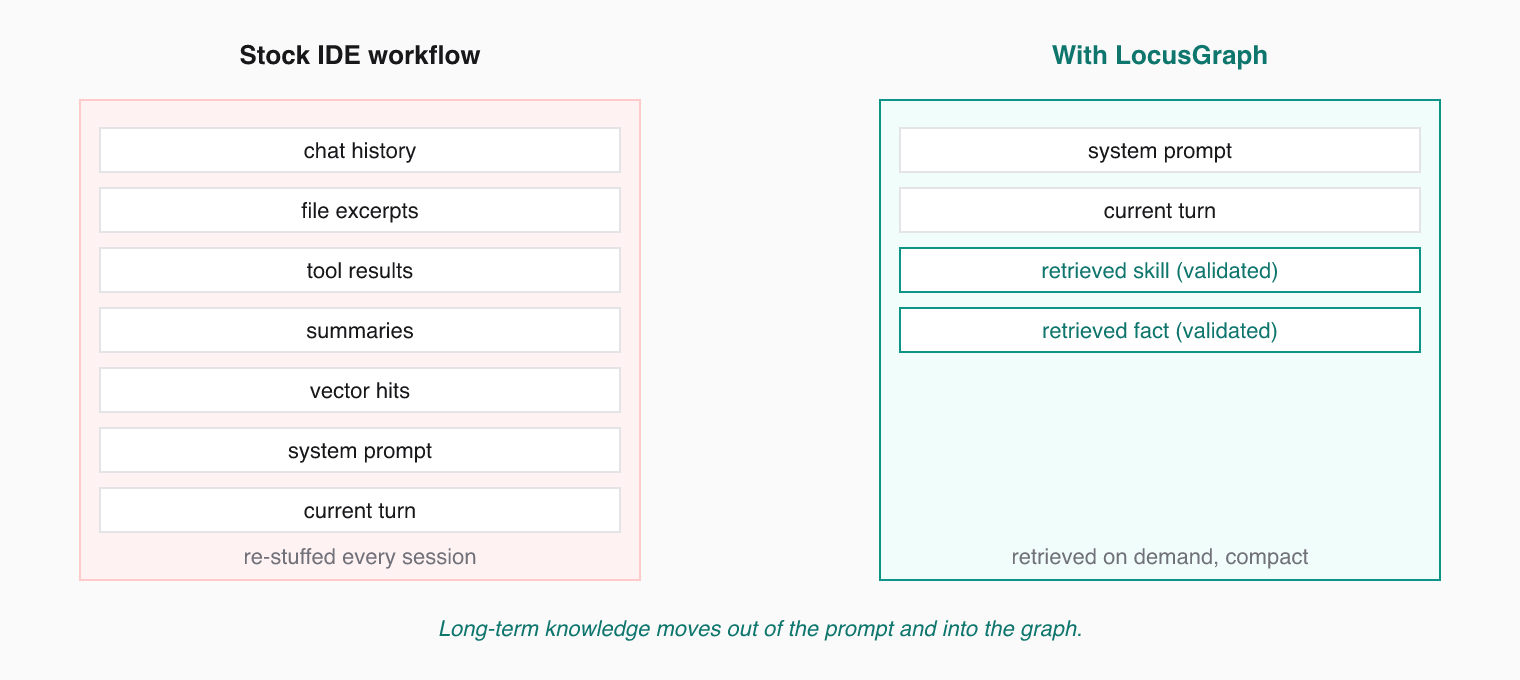 ### What Eats Tokens Today
Most AI IDE setups, by default, send the model on every turn:
* chat history
* file excerpts
* tool results
* summaries of past sessions
* vector-store hits
* system prompt
* the user's current message
That stack works for the current turn but it is **rented context**. It has to be reintroduced again later. Every new session pays the same token cost to rebuild the same picture.
### What LocusGraph Sends Instead
When LocusGraph is the knowledge layer, the prompt for a turn is:
* system prompt
* the user's current message
* a small number of validated, retrieved knowledge nodes scoped to the current task
That is it. The agent does not need to carry its history into the prompt because its history is already shaped into knowledge it can query.
### Why This Compounds
| Strategy | Typical token impact |
| --------------------------------------------------- | --------------------------------------------------- |
| Tight scoping + low limit | \~5x smaller than dumping chat history |
| Skill-level retrieval (graduated `skill:` contexts) | \~10x smaller than raw event replay |
| Summarized sessions linked with `extends` | Replaces hundreds of session messages with one node |
| Default vector RAG without filters | Largest — competes hardest with output budget |
As the graph matures and skills graduate, retrievals get **smaller**, not bigger. A pattern that took 30 events to reinforce can be retrieved as a single skill node when the agent needs it.
### The Token Math
For a long-running coding agent across many sessions, the difference shows up as:
* fewer tokens per turn (retrieved knowledge is dense)
* fewer tokens per session (no need to rebuild context)
* fewer tokens per *month* (skills graduate, replays shrink)
* and importantly: **less drift** in agent quality, because the model gets the same validated inputs every time.
The best way to lower an agent's token bill is not to compress prompts harder. It is to stop sending the same things over and over by moving long-term knowledge out of the prompt.
### Next
### What Eats Tokens Today
Most AI IDE setups, by default, send the model on every turn:
* chat history
* file excerpts
* tool results
* summaries of past sessions
* vector-store hits
* system prompt
* the user's current message
That stack works for the current turn but it is **rented context**. It has to be reintroduced again later. Every new session pays the same token cost to rebuild the same picture.
### What LocusGraph Sends Instead
When LocusGraph is the knowledge layer, the prompt for a turn is:
* system prompt
* the user's current message
* a small number of validated, retrieved knowledge nodes scoped to the current task
That is it. The agent does not need to carry its history into the prompt because its history is already shaped into knowledge it can query.
### Why This Compounds
| Strategy | Typical token impact |
| --------------------------------------------------- | --------------------------------------------------- |
| Tight scoping + low limit | \~5x smaller than dumping chat history |
| Skill-level retrieval (graduated `skill:` contexts) | \~10x smaller than raw event replay |
| Summarized sessions linked with `extends` | Replaces hundreds of session messages with one node |
| Default vector RAG without filters | Largest — competes hardest with output budget |
As the graph matures and skills graduate, retrievals get **smaller**, not bigger. A pattern that took 30 events to reinforce can be retrieved as a single skill node when the agent needs it.
### The Token Math
For a long-running coding agent across many sessions, the difference shows up as:
* fewer tokens per turn (retrieved knowledge is dense)
* fewer tokens per session (no need to rebuild context)
* fewer tokens per *month* (skills graduate, replays shrink)
* and importantly: **less drift** in agent quality, because the model gets the same validated inputs every time.
The best way to lower an agent's token bill is not to compress prompts harder. It is to stop sending the same things over and over by moving long-term knowledge out of the prompt.
### Next
## 5. How is LocusGraph Different from Other Memory Systems?
import { LinkCard } from '../../components/link-card.tsx'
import { Callout } from '../../components/Callout.tsx'
Most memory systems retrieve similar text. LocusGraph evolves knowledge.
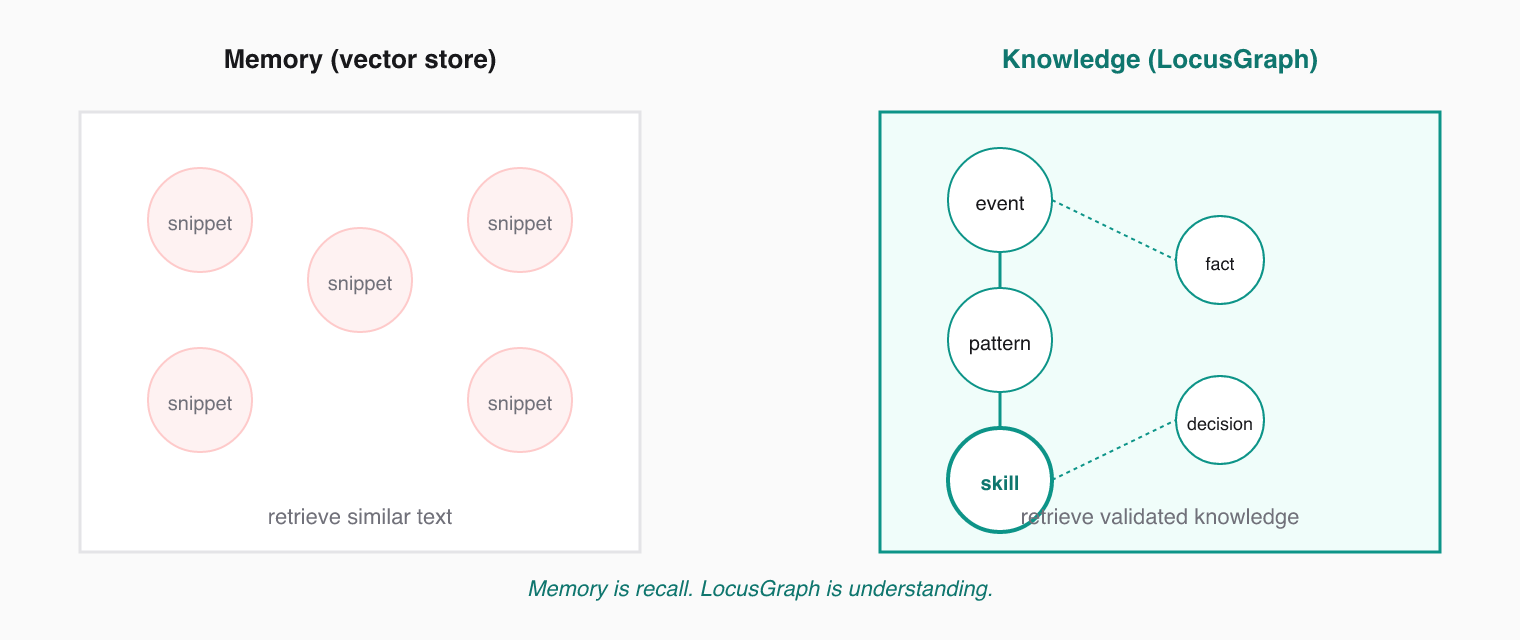 ### The Short Version
Vector-based memory systems like Mem0 or Zep are useful for finding related snippets. Conversation buffers like LangGraph memory are useful for carrying recent chat state. Neither, on its own, turns repeated agent experience into validated knowledge.
LocusGraph is different because it combines:
* **Typed events** instead of unstructured blobs
* An **admission pipeline** instead of blind storage
* **Confidence scoring** instead of static recall
* **Typed links** instead of isolated memories
* **Semantic retrieval** over structured knowledge
* A **graduation chain** from event to pattern to skill
### Side-by-Side
| Capability | Vector memory | Conversation buffer | LocusGraph |
| ------------ | --------------------- | ------------------- | ------------------------------------------------- |
| Format | Text + embeddings | Sequential turns | Typed events with payload + links |
| Admission | Append everything | Append everything | Validated, classified, scored |
| Decay | None | Truncated by window | Contradictions lower confidence |
| Linking | Implicit (similarity) | None | Explicit (`reinforces`, `contradicts`, `extends`) |
| Graduation | None | None | Event → Pattern → Skill |
| LLM agnostic | Often vendor-specific | Per framework | Yes, by design |
| Output | Similar snippets | Last N turns | Validated knowledge for the task |
### Why "Memory" Undersells This
Calling LocusGraph "agent memory" puts it in a commodity category against simpler tools.
* Memory means **recall**.
* Knowledge means **understanding**.
Recall says "here is something similar." Understanding says "here is the validated learning that applies to this task." LocusGraph delivers the latter and that is the entire point.
The category to remember is **Structured Agent Knowledge**. Not "another memory system."
### When Each Tool Is the Right Fit
| You need... | Reach for |
| ------------------------------------------------- | --------------------------------------------- |
| Short-term chat continuity within a session | A conversation buffer (e.g. LangGraph memory) |
| Look-up of similar text from a corpus | A vector store (Mem0, Zep, your own pgvector) |
| Durable, validated agent knowledge that compounds | LocusGraph |
These are not always either/or — vector retrieval can sit next to LocusGraph for document RAG while LocusGraph carries the agent's accumulated knowledge.
### Next
### The Short Version
Vector-based memory systems like Mem0 or Zep are useful for finding related snippets. Conversation buffers like LangGraph memory are useful for carrying recent chat state. Neither, on its own, turns repeated agent experience into validated knowledge.
LocusGraph is different because it combines:
* **Typed events** instead of unstructured blobs
* An **admission pipeline** instead of blind storage
* **Confidence scoring** instead of static recall
* **Typed links** instead of isolated memories
* **Semantic retrieval** over structured knowledge
* A **graduation chain** from event to pattern to skill
### Side-by-Side
| Capability | Vector memory | Conversation buffer | LocusGraph |
| ------------ | --------------------- | ------------------- | ------------------------------------------------- |
| Format | Text + embeddings | Sequential turns | Typed events with payload + links |
| Admission | Append everything | Append everything | Validated, classified, scored |
| Decay | None | Truncated by window | Contradictions lower confidence |
| Linking | Implicit (similarity) | None | Explicit (`reinforces`, `contradicts`, `extends`) |
| Graduation | None | None | Event → Pattern → Skill |
| LLM agnostic | Often vendor-specific | Per framework | Yes, by design |
| Output | Similar snippets | Last N turns | Validated knowledge for the task |
### Why "Memory" Undersells This
Calling LocusGraph "agent memory" puts it in a commodity category against simpler tools.
* Memory means **recall**.
* Knowledge means **understanding**.
Recall says "here is something similar." Understanding says "here is the validated learning that applies to this task." LocusGraph delivers the latter and that is the entire point.
The category to remember is **Structured Agent Knowledge**. Not "another memory system."
### When Each Tool Is the Right Fit
| You need... | Reach for |
| ------------------------------------------------- | --------------------------------------------- |
| Short-term chat continuity within a session | A conversation buffer (e.g. LangGraph memory) |
| Look-up of similar text from a corpus | A vector store (Mem0, Zep, your own pgvector) |
| Durable, validated agent knowledge that compounds | LocusGraph |
These are not always either/or — vector retrieval can sit next to LocusGraph for document RAG while LocusGraph carries the agent's accumulated knowledge.
### Next
## 1. What is LocusGraph?
import { LinkCard } from '../../components/link-card.tsx'
import { Callout } from '../../components/Callout.tsx'
LocusGraph is a typed knowledge graph with an admission pipeline, confidence scoring, and semantic retrieval. It is designed to sit between an AI agent and its LLM, replacing dumb chat-history or vector-search memory with structured knowledge that compounds.
### In One Line
LocusGraph turns what your agents learn into structured knowledge that compounds, so events become patterns, patterns become skills, and every session starts smarter.
### What It Actually Does
Every useful event your agent produces — a `fact`, `action`, `decision`, `observation`, or `feedback` — enters LocusGraph and is admitted, typed, scoped, linked to related knowledge, and given a confidence score. Once admitted, that knowledge is permanent and retrievable across sessions.
LocusGraph exposes five operations:
* **Store** typed events from agents, users, systems, validators, and executors.
* **Retrieve** validated knowledge with semantic search and context filters.
* **Connect** knowledge through `reinforces`, `contradicts`, `extends`, and `related_to` links.
* **Organize** knowledge into contexts and isolated graph workspaces.
* **Reason** over accumulated knowledge to generate insights and recommendations.
### What LocusGraph Is Not
| It is not... | Because... |
| --------------------- | ----------------------------------------------------------------------------------- |
| A chat history buffer | Chat history is recall. LocusGraph stores understanding. |
| A plain vector store | Vector stores retrieve similar text. LocusGraph retrieves validated knowledge. |
| A new LLM provider | LocusGraph is LLM agnostic — it works behind any model. |
| Just "agent memory" | Memory means recall. Knowledge means understanding. LocusGraph delivers the latter. |
The category is **Structured Agent Knowledge**. "Structured" separates LocusGraph from dump-everything vector stores. "Agent" says exactly who it is for. "Knowledge" is a step above memory.
### Next
## Managing Context Windows
Agent context windows are finite. Every token counts. Structured Agent Knowledge keeps the right learnings in front of the model and the rest out of the prompt.
import { Callout } from '../../components/Callout.tsx'
import { LinkCard } from '../../components/link-card.tsx'
### The Problem
Large language models have fixed context windows. Fill them with irrelevant text and the agent loses focus. Fill them with too little and the agent lacks the knowledge it needs. The traditional fix — stuffing chat history and vector hits into every prompt — burns tokens and still fails to compound learning.
LocusGraph changes this. Long-term knowledge moves out of the prompt and into a structured knowledge graph. The agent retrieves compact, validated knowledge only when it needs it.
### Retrieve Only What Matters
The first rule: do not dump the entire graph into the prompt. Use specific queries and filters to pull only the knowledge relevant to the current task.
```json
{
"tool": "retrieve_memories",
"arguments": {
"query": "payment validation edge cases",
"context_types": { "error": ["payment_validation"] },
"limit": 5
}
}
```
Five highly relevant facts beat fifty loosely related ones.
### The Graduation Chain
LocusGraph's admission pipeline naturally compresses experience through graduation:
```text
event -> pattern -> skill
```
1. **Event** — a single observation, action, decision, or fact gets recorded.
2. **Pattern** — repeated events get reinforced, boosting confidence.
3. **Skill** — graduated knowledge that the agent can retrieve as a single, dense node.
Each step is denser and more actionable than the last. When your agent retrieves a `skill:` context, it gets the distilled lesson without needing the full history of mistakes that led there. That is how token usage stays small even as the agent gets wiser.
Design your agent to graduate knowledge. When it solves the same problem three times, store a skill event that summarizes the solution. Link it to the original events with `extends`.
### Summarization
For long-running agents, summarize periodically. Store a summary event that captures the key points from a session or project phase, then link it to the originals with `extends`.
```json
{
"tool": "store_event",
"arguments": {
"context_id": "session:2025_03_19_summary",
"event_kind": "observation",
"source": "agent",
"payload": {
"topic": "session summary",
"value": "Fixed 3 payment bugs. Root cause was missing null checks in middleware. Added validation layer."
},
"extends": ["session:2025_03_19"]
}
}
```
Future retrievals pull the summary instead of replaying the entire session.
### Pruning Stale Knowledge
You do not need to manually delete old knowledge. LocusGraph handles this through confidence scoring:
* **Contradicted loci** lose confidence and drop in retrieval ranking.
* **Unreinforced loci** stay at baseline confidence and get outranked by reinforced knowledge.
* **Reinforced loci** rise to the top naturally and graduate into skills.
The graph acts as a living filter. Validated knowledge surfaces. Stale or incorrect knowledge fades.
### Token Cost Heuristics
| Strategy | Typical token impact |
| --------------------------------------------------- | --------------------------------------------------- |
| Tight scoping + low limit | \~5x smaller than dumping chat history |
| Skill-level retrieval (graduated `skill:` contexts) | \~10x smaller than raw event replay |
| Summarized sessions linked with `extends` | Replaces hundreds of session messages with one node |
| Default vector RAG without filters | Largest — competes hardest with model output budget |
### Guidelines
| Strategy | When to Use |
| -------------------------------------- | ----------------------------------------------- |
| Tight scoping + low limit | Focused tasks with clear context needs |
| Broad query + moderate limit | Exploration and discovery phases |
| Summarization | End of sessions or project milestones |
| Graduation (event to pattern to skill) | Recurring problems the agent should internalize |
### Next
## Designing Memory Schemas
A good schema makes structured agent knowledge discoverable. A bad one buries it.
import { Callout } from '../../components/Callout.tsx'
import { LinkCard } from '../../components/link-card.tsx'
### What "Schema" Means Here
In LocusGraph, the schema is the agreement between your agent and the graph about *how knowledge looks*: which context types you use, what payload shape every event follows, and how related events get linked. The schema is what lets confidence scoring work and graduation produce real skills instead of disconnected blobs.
### Context ID Conventions
Context IDs follow the format `type:name`. The type groups related knowledge; the name identifies the specific context. Use consistent prefixes across your agent.
Common type prefixes:
| Prefix | Purpose | Example |
| -------------- | -------------------------------------- | ----------------------- |
| `skill:` | Graduated capabilities | `skill:react_hooks` |
| `error:` | Error patterns and fixes | `error:null_pointer` |
| `session:` | Session-specific context | `session:2025_03_19` |
| `project:` | Project-level knowledge | `project:auth_module` |
| `user:` | User preferences and facts | `user:display_settings` |
| `agent:` | Role boundaries in multi-agent systems | `agent:planner` |
Pick a naming convention and stick with it. Snake case works well. Avoid spaces or special characters in names.
### Payload Design
Payloads carry the actual knowledge. The simplest pattern uses `topic` and `value` fields:
```json
{
"topic": "useEffect cleanup",
"value": "Always return a cleanup function when subscribing to external stores"
}
```
For richer knowledge, use structured objects:
```json
{
"error_type": "NullPointerException",
"trigger": "Accessing user.profile before auth check",
"fix": "Add null guard in middleware",
"confidence": "high"
}
```
Keep payloads consistent within a context type. If `error:` contexts always have `error_type`, `trigger`, and `fix` fields, retrieval results become predictable and parseable.
### Schema for a Coding Agent
Here is an example schema for an agent that assists with software development:
* **`error:null_pointer`** — stores null reference patterns, triggers, and fixes
* **`skill:react_hooks`** — stores graduated best practices, anti-patterns, and learned techniques
* **`session:2025_03_19`** — stores decisions and observations from today's session
* **`project:auth_module`** — stores architectural decisions and module-level context
Each context type uses a consistent payload shape. The agent stores events as they occur and retrieves them by type or semantic query. Repeated occurrences in `error:` and `skill:` contexts are exactly what graduate into reusable skills.
### Hierarchies and Links
Use link arrays (`reinforces`, `extends`, `contradicts`, `related_to`) to connect knowledge across contexts. When an agent encounters the same error twice, the second event `reinforces` the first. When a skill graduates from a pattern, the new event `extends` the original.
Links create a connected graph instead of isolated facts. Connected knowledge gathers confidence faster and graduates from event to pattern to skill — exactly what raises retrieval quality over time.
### Schema Smell Test
Before shipping a schema, run through this:
| Question | If "no"... |
| ---------------------------------------------------------- | -------------------------------------------------------------- |
| Can a teammate guess the right context ID for a new event? | Tighten naming or add a small reference table |
| Do payloads in the same context type share the same keys? | Pick a canonical payload shape per context type |
| Will repeated events naturally reinforce each other? | Add a stable `topic` so semantically equal events line up |
| Will contradictions be obvious to the agent? | Make sure the agent emits `contradicts` when correcting itself |
### Next
## Context Engineering
Context engineering is the discipline of choosing what knowledge your agent stores, how it is shaped, and what gets retrieved at the right moment. LocusGraph is the Structured Agent Knowledge layer that makes that discipline practical.
import { Callout } from '../../components/Callout.tsx'
import { LinkCard } from '../../components/link-card.tsx'
### The Misconception
"Context engineering" describes a discipline, not a product category. Saying "we do context engineering" is like saying "we do software engineering" — true, but not specific enough.
Calling LocusGraph "agent memory" is also too small. Memory means recall. Knowledge means understanding. LocusGraph turns agent experience into typed, linked, scored knowledge that compounds over time, so the agent does not just remember — it becomes wiser.
### Why It Matters
The difference between an agent that flounders and one that grows wiser is not the model. It is the structured agent knowledge feeding the model.
Context engineering with LocusGraph answers three questions:
1. **What do you store?** Not every event deserves a place in the graph. Store decisions, learned skills, error patterns, and key facts. Skip transient noise.
2. **How do you shape it?** Context IDs, payload schemas, and linking strategies determine how knowledge connects, scores, and graduates from event to pattern to skill.
3. **When do you retrieve it?** Query design, scoping filters, and limit tuning control what knowledge enters the agent's context window.
### Three Pillars
#### Schema Design
Define consistent context ID conventions and payload structures. A coding agent might use `skill:react_hooks`, `error:null_pointer`, and `session:2025_03_19`. Consistency makes retrieval predictable and graduation reliable.
#### Scoping Strategy
Use graph-level, type-level, and name-level filters to control the search space. Scoping prevents irrelevant knowledge from polluting the agent's context window.
#### Retrieval Tuning
Adjust query specificity, result limits, and context filters to balance precision and recall. Start narrow, widen only when needed. Confidence scoring keeps validated knowledge at the front.
Context engineering is iterative. Start with simple schemas, observe what your agent retrieves, and refine. LocusGraph's confidence scoring helps surface what works and suppress what does not.
### Where LocusGraph Plays an Active Role
| Stage | Without LocusGraph | With LocusGraph |
| --------- | -------------------------------------- | ---------------------------------------------------------------- |
| Capture | Append to chat history or vector store | Typed event admitted with source, payload, links, and confidence |
| Retrieval | Similar text returned | Validated knowledge ranked by relevance and confidence |
| Reuse | Re-explain context every session | Graduated skills retrieved on demand |
| Decay | Stale snippets stay forever | Contradictions lower confidence; bad knowledge fades |
### Next
## Memory Relevance & Retrieval
Semantic search, confidence scoring, and filters work together to surface validated knowledge — not just similar text. This is where Structured Agent Knowledge actively beats vector recall.
import { Callout } from '../../components/Callout.tsx'
import { LinkCard } from '../../components/link-card.tsx'
### What Retrieval Returns
When you call `retrieve_memories`, LocusGraph runs three steps in order: filter the candidate set by scope, rank what is left by semantic similarity, then adjust ranking by confidence. The agent gets a small, validated payload — not a wall of similar snippets.
### Semantic Search
Your query is embedded into a vector and matched against stored knowledge using semantic similarity. LocusGraph returns results ranked by relevance — not keyword matching, but meaning.
A query like "handling null values" can match a stored learning like "NullPointerException in user profile access" even though they share few exact words.
### Limit Parameter
The `limit` parameter controls how many results come back. Defaults vary, but you should set it explicitly.
* **Start small (5-10).** Most agents need a handful of validated facts, not a wall of text.
* **Increase when exploring.** If you are surveying a broad topic, raise the limit to 20-30.
* **Decrease for precision tasks.** When the agent needs one specific answer, set limit to 3-5.
```json
{
"tool": "retrieve_memories",
"arguments": {
"query": "database connection pooling",
"limit": 5
}
}
```
### Context Filters
Filters narrow the search space before semantic matching runs. This improves both speed and relevance. See [Scoping Strategies](/context-engineering/scoping-strategies) for details on combining filters.
The order of operations:
1. Filters remove non-matching contexts from the candidate set.
2. Semantic search ranks the remaining candidates.
3. Confidence scoring adjusts the final ranking.
4. Top results up to `limit` are returned.
### Confidence and Ranking
Every locus in LocusGraph carries a confidence score. Confidence changes over time and is what ensures only validated knowledge gets brought to the forefront:
* **Reinforced knowledge ranks higher.** When multiple events confirm the same fact, its confidence increases. Patterns rise. Skills graduate.
* **Contradicted knowledge drops.** When new evidence contradicts existing knowledge, the original locus loses confidence and falls in ranking. It does not disappear — it simply becomes less prominent.
* **Fresh knowledge starts neutral.** New loci begin with a baseline confidence. Repeated reinforcement or contradiction adjusts them over time.
You do not manage confidence manually. LocusGraph updates confidence automatically based on event links (`reinforces`, `contradicts`). Design your agent to emit these links and the graph handles the rest.
### Vector Memory vs. LocusGraph Retrieval
| Aspect | Vector memory | LocusGraph |
| -------------- | -------------------------------------- | --------------------------------------------- |
| Match basis | Cosine similarity over text | Semantic similarity + structured filters |
| Ranking | Similarity score only | Similarity score + confidence + source weight |
| Decay | None — old text ranks the same forever | Contradictions lower ranking automatically |
| Contradictions | Both versions can be returned silently | Contradicted version drops in ranking |
| Output | "Similar snippets" | "Validated knowledge for this task" |
### Retrieval Tuning Tips
1. **Be specific in queries.** "React useEffect cleanup patterns" retrieves better results than "React stuff."
2. **Combine semantic queries with type filters.** Search for "common mistakes" within `error:` contexts.
3. **Watch for noise.** If irrelevant results appear, tighten your scope or lower the limit.
4. **Use `include_ids` for debugging.** When results seem off, include locus IDs to inspect what is being returned and why it ranked.
### Next
## Context Scoping Strategies
Scoping controls what structured agent knowledge your agent sees in a given retrieval. Tighter scoping means more relevant, higher-confidence results.
import { Callout } from '../../components/Callout.tsx'
import { LinkCard } from '../../components/link-card.tsx'
### Why Scope First
The fastest way to make an agent dumber is to give it everything. The fastest way to make it sharper is to give it the right slice. LocusGraph offers three scoping layers that combine cleanly: graph, type, and name.
### Three Levels of Scoping
#### Graph-Level Scoping
Separate graphs isolate knowledge entirely. Use different graph IDs for different projects, teams, or environments. Knowledge in one graph never leaks into another.
```json
{
"tool": "retrieve_memories",
"arguments": {
"query": "authentication patterns",
"graph_id": "project-alpha"
}
}
```
Graph-level scoping is the coarsest filter. Use it when knowledge domains are completely independent.
#### Type-Level Scoping
Filter by `context_types` to retrieve only specific categories of knowledge. This narrows the search space before semantic matching begins.
```json
{
"tool": "retrieve_memories",
"arguments": {
"query": "common mistakes",
"context_types": { "error": [] }
}
}
```
Pass an empty array to match all names within that type. Pass specific names to narrow further.
#### Name-Level Scoping
Filter by exact `context_ids` to retrieve knowledge from specific contexts only.
```json
{
"tool": "retrieve_memories",
"arguments": {
"query": "best practices",
"context_ids": ["skill:react_hooks", "skill:typescript_generics"]
}
}
```
Name-level scoping is the most precise. Use it when you know exactly which contexts are relevant.
### Combining Filters
Filters stack. Combine type-level and name-level scoping for precise retrieval.
**Example:** Retrieve only error patterns from the current project.
```json
{
"tool": "retrieve_memories",
"arguments": {
"query": "recurring bugs in payment flow",
"context_types": { "error": ["payment_null", "payment_timeout"] }
}
}
```
Start broad and narrow down. If your agent retrieves too much noise, add a type filter. If results are still noisy, scope to specific context names.
### Scoping Strategy by Use Case
| Use Case | Scope |
| --------------------------- | ------------------------------------ |
| General agent knowledge | No filters (graph-wide search) |
| Task-specific knowledge | Type filter (`skill:`, `error:`) |
| Session continuity | Name filter (`session:2025_03_19`) |
| Cross-project patterns | Graph-level separation + type filter |
| Debugging a specific module | Name filter (`error:auth_module`) |
| Multi-agent collaboration | Type filter on `agent:` |
### Anti-Patterns
| Anti-pattern | Why it hurts |
| ------------------------------------------- | ------------------------------------------------------------------- |
| One giant graph for everything | Retrieval quality drops as unrelated knowledge competes for ranking |
| Random per-call context names | Repeated events cannot reinforce each other and never graduate |
| Filtering only by `graph_id` for everything | You miss the leverage of type-level recall on `skill:` and `error:` |
### Next
## Contexts & Graphs
Contexts and graphs are how LocusGraph organizes structured agent knowledge. Graphs isolate workspaces. Contexts group related learnings inside a workspace.
import { Callout } from '../../components/Callout.tsx'
import { LinkCard } from '../../components/link-card.tsx'
### Why Scope Matters
An agent that retrieves everything from one big bucket gets noise. An agent that retrieves from a tight, well-shaped scope gets validated knowledge it can actually use. Graphs and contexts are the two scoping layers that make that possible.
### Graph IDs
A graph is a top-level workspace for structured agent knowledge. Each graph is fully isolated — knowledge in one graph cannot be retrieved from another.
Use separate graphs for:
* Different projects
* Different teams
* Different agents
* Production vs. staging environments
Pass `graph_id` when initializing the client or on each API call. The default value is `"default"`.
### Context IDs
Context IDs group related knowledge within a graph. They follow a `type:name` format:
```
skill:react_best_practices
session:20250319_ab3f
project:locusgraph_docs
task:onboarding_flow
```
The type prefix (before the colon) lets you query all contexts of a given type. For example, retrieve all `skill:` contexts to see every skill the agent has graduated across the graph.
### Format Rules
Context IDs are normalized automatically: lowercased, spaces replaced with underscores, truncated to 256 characters.
| Rule | Detail |
| ---------------- | --------------------------- |
| Format | `type:name` |
| Valid characters | `a-z`, `0-9`, `_`, `-`, `:` |
| Max length | 256 characters |
| Case | Lowercased on admission |
| Spaces | Converted to `_` |
These are all valid:
```
skill:error_handling
session:2025-03-19_morning
project:my-api
user:preferences
```
These are normalized:
```
skill:React Best Practices -> skill:react_best_practices
MY_SKILL:Testing -> my_skill:testing
```
### Common Context Types
The type prefix serves as a namespace. These are conventions, not enforced categories — but staying close to them keeps retrieval predictable.
| Type | Use Case |
| -------------- | --------------------------------------------------- |
| `skill` | Graduated capabilities and best practices |
| `session` | Conversation or interaction boundaries |
| `project` | Project-scoped knowledge |
| `task` | Task-specific context |
| `error` | Error patterns and fixes |
| `user` | Per-user preferences and history |
| `agent:` | Multi-agent role boundaries (e.g., `agent:planner`) |
### Scoping in Practice
When storing an event, pass `context_id` to attach it to a context:
```json
{
"event_kind": "fact",
"source": "agent",
"context_id": "skill:react_best_practices",
"payload": { "topic": "hooks", "value": "prefer useReducer for complex state" }
}
```
When retrieving, filter by context to narrow results:
```json
{
"query": "state management",
"context_id": "skill:react_best_practices",
"limit": 10
}
```
### Graph Strategy
| Setup | Suggested Graphs |
| ------------------------- | ------------------------------------------------------- |
| Solo agent on one product | One graph |
| Team with shared agents | One graph per project + scoped contexts per agent |
| Multi-tenant SaaS | One graph per tenant |
| Prod + staging | Separate graphs to keep test data out of prod retrieval |
### Next
## Event Kinds
Event kinds tell LocusGraph what type of agent knowledge you are storing. The kind drives how it gets typed, linked, scored, and graduated.
import { Callout } from '../../components/Callout.tsx'
import { LinkCard } from '../../components/link-card.tsx'
### Why Kinds Matter
A vector store treats all text the same. Structured Agent Knowledge does not. A `decision` is not the same as an `observation`. A `feedback` from the user has more weight than an `observation` from the agent. The kind is what lets LocusGraph route an event correctly through admission and into the right place on the graduation plane.
### Primary Kinds
#### fact
**Aliases:** `knowledge`, `learned`
Persistent knowledge that remains true over time. Use for preferences, configurations, and learned truths the agent should keep.
> "The user prefers dark mode." / "The API rate limit is 1000 req/min."
#### action
**Aliases:** `task`, `operation`, `execution`, `completed`
Something happened. A task was performed or a process completed.
> "Deployed version 2.3." / "Sent the weekly report."
#### decision
**Aliases:** `choice`, `selection`, `determination`
A choice was made with reasoning. Records the what and the why so future agents can build on it instead of re-deciding.
> "Selected PostgreSQL over MySQL for JSONB support."
#### observation
General notes and impressions. The default kind for unclassified events.
> "Build times increased after adding the new dependency."
#### feedback
Opinions, ratings, or suggestions from users. Carries subjective weight that influences ranking.
> "User rated the response 4/5." / "User suggested shorter summaries."
### Special Kinds
#### constraint / rule / constraint\_violation
Validation-related events. When a `constraint_violation` is stored, a `derived_from` link is auto-created to the source context.
#### routine / heartbeat / status
Mapped to `routine_operation`. Filtered from standard retrieval. Use for health checks and lifecycle tracking.
#### noise / debug / log
Mapped to `noise`. Filtered from retrieval entirely. Exists for audit only.
### Kind-to-Internal Mapping
| Input Kind | Internal Type | Retrievable |
| ------------------------------------------------------- | -------------------- | ----------- |
| `fact`, `knowledge`, `learned` | `knowledge_recorded` | Yes |
| `action`, `task`, `operation`, `execution`, `completed` | `action_completed` | Yes |
| `decision`, `choice`, `selection`, `determination` | `decision_made` | Yes |
| `observation` | `knowledge_recorded` | Yes |
| `feedback` | `knowledge_recorded` | Yes |
| `constraint`, `rule`, `constraint_violation` | `knowledge_recorded` | Yes |
| `routine`, `heartbeat`, `status` | `routine_operation` | No |
| `noise`, `debug`, `log` | `noise` | No |
When in doubt, use `fact` for things that are true and `observation` for things you noticed. The admission pipeline handles the rest, including which events feed the event → pattern → skill graduation chain.
### Picking the Right Kind
| You want to record... | Use kind |
| ------------------------------------------ | ---------------------- |
| A stable truth that should persist forever | `fact` |
| An execution that happened | `action` |
| A choice made and why | `decision` |
| A pattern noticed during work | `observation` |
| A user opinion or rating | `feedback` |
| A failed validation or rule trigger | `constraint_violation` |
### Next
## Memories & Events
Events are the atomic unit of structured agent knowledge. Every learning enters LocusGraph as an event and graduates from there.
import { Callout } from '../../components/Callout.tsx'
import { LinkCard } from '../../components/link-card.tsx'
### Why Events, Not Messages
Most "agent memory" systems append messages to a chat log and retrieve similar text. LocusGraph treats every learning as a structured event with a kind, a source, a payload, a context, and links — so it can be admitted, scored, and graduated into a skill instead of just remembered.
### Event Shape
An event is a single piece of agent experience submitted to LocusGraph. Each event has shape:
| Field | Required | Description |
| ------------ | -------- | ------------------------------------------------------------------------------ |
| `event_kind` | Yes | The type of knowledge: `fact`, `action`, `decision`, `observation`, `feedback` |
| `source` | Yes | Who created it: `agent`, `user`, `system`, `validator`, `executor` |
| `payload` | Yes | JSON object containing the actual knowledge |
| `context_id` | No | Scope the event to a context (e.g., `skill:react_best_practices`) |
| `links` | No | Connections to other loci or contexts |
That structure is what separates LocusGraph from a vector blob store.
### From Event to Locus
Events do not land in the graph as raw text. They pass through the **admission pipeline**, which validates, classifies, extracts topics, and creates a permanent **locus** in your structured agent knowledge graph.
A locus is the graph-native representation of admitted knowledge. Once created, it participates in retrieval, linking, and confidence scoring. This is the first step that turns recall into understanding.
### Kind Mapping
Raw event kinds map to internal types during admission:
| Input Kind | Internal Type |
| ---------------------------------- | ------------------------------ |
| `fact`, `knowledge`, `observation` | `knowledge_recorded` |
| `action`, `task` | `action_completed` |
| `decision`, `choice` | `decision_made` |
| `routine`, `heartbeat`, `status` | `routine_operation` (filtered) |
| `noise`, `debug`, `log` | `noise` (filtered) |
Events classified as `routine_operation` or `noise` are recorded but excluded from standard retrieval. They exist for audit purposes only.
### Events Become Patterns Become Skills
This is the core graduation chain in LocusGraph:
```text
event -> pattern -> skill
```
A single event is data. Repeated events linked together with `reinforces` become a pattern with rising confidence. Patterns that keep proving useful graduate into skills the agent can retrieve in future work.
You do not have to manage this manually. Linking the right events at admission is enough — confidence scoring and retrieval handle the rest.
### Retrieval
When you call `retrieveMemories`, LocusGraph searches across admitted loci, not raw events. Queries are matched against topics, payload content, and graph connections, then ranked by relevance and confidence. Only validated knowledge gets brought to the forefront.
### Next
## Memory Links
Links connect loci inside LocusGraph. They are the typed relationships that drive how knowledge gets retrieved, scored, and graduated from event to pattern to skill.
import { Callout } from '../../components/Callout.tsx'
import { LinkCard } from '../../components/link-card.tsx'
### Why Links Are the Engine
Plain memory systems store isolated snippets. LocusGraph treats relationships as first-class. Two events that `reinforce` each other together carry more confidence than either alone. A new event that `contradicts` an old one quietly demotes the old one in retrieval. This is how memory becomes knowledge.
### Link Types
Five link types, ordered from weakest to strongest effect:
#### related\_to
General association between two loci. No side effects on confidence scoring. Use when knowledge is connected but does not modify the target.
#### extends
Adds detail to another locus. No side effects on confidence. The extending locus is returned alongside the target during retrieval.
#### derived\_from
Indicates the source locus was created because of the target. Auto-created for `constraint`, `rule`, and `constraint_violation` events when a `context_id` is present.
#### reinforces
Confirms another locus. Each `reinforces` link increases the target's confidence by **+0.05**, capped at **1.0**. Use when new evidence supports existing knowledge — this is what drives the event → pattern → skill graduation chain.
#### contradicts
Conflicts with another locus. Each `contradicts` link decreases the target's confidence by **-0.10**, with a floor of **0.2**. The target is never fully removed — low-confidence loci are deprioritized in retrieval instead so old knowledge fades but stays auditable.
Confidence adjustments from `reinforces` and `contradicts` are applied during admission. They compound: three `reinforces` links add +0.15 to the target's confidence and push the underlying knowledge closer to skill-grade.
### Link Layers
Links operate across three layers:
| Layer | Connects | Example |
| ----------------- | ------------------------------ | ------------------------------------------------ |
| Locus → Locus | Two individual knowledge nodes | A decision reinforces a fact |
| Locus → Context | A node to a context scope | A skill locus extends a session context |
| Context → Context | Two context scopes | A project context is related\_to a skill context |
### Example: The Graduation Chain
Links are how a single event becomes a pattern and then a skill:
1. **Event recorded.** The agent stores an observation: "Used `var` instead of `const` in React component."
2. **Pattern detected.** After seeing this twice, the agent stores a fact: "Repeated use of `var` in React." It links this to the original observation with `derived_from`.
3. **Skill formed.** The agent stores a decision: "Always use `const` or `let` in React components." It links this to the pattern with `extends` and to the original event with `reinforces` — confirming the learned lesson.
```text
observation: "used var"
<- derived_from <- fact: "repeated var pattern"
<- extends <- decision: "always use const/let"
-> reinforces -> observation: "used var"
```
LocusGraph now returns the skill-level decision in retrieval, backed by the full chain of evidence. Validated knowledge sits at the front of the queue.
### Creating Links
Pass links when storing an event:
```json
{
"event_kind": "fact",
"source": "agent",
"payload": { "topic": "const_usage", "value": "always use const in React" },
"links": [
{ "type": "reinforces", "target": "locus_abc123" },
{ "type": "derived_from", "target": "locus_def456" }
]
}
```
### Link Cheatsheet
| Use case | Reach for |
| ------------------------------------------------------------- | -------------- |
| New event confirms an old learning | `reinforces` |
| New event overrides an old learning | `contradicts` |
| New event adds detail to an existing one | `extends` |
| Event was created because of a rule or context | `derived_from` |
| Two events touch the same area but neither modifies the other | `related_to` |
### Next
## Payload Structure
Payloads carry the actual knowledge inside an event. They are the smallest unit of structured agent knowledge that you control directly, so shape them well.
import { Callout } from '../../components/Callout.tsx'
import { LinkCard } from '../../components/link-card.tsx'
### Recommended Format
Use a flat object with `topic` and `value` keys:
```json
{
"payload": {
"topic": "user_preference",
"value": "dark mode"
}
}
```
The `topic` field helps LocusGraph index and cluster related knowledge. The `value` field holds the actual content.
### Good Payloads
Keep payloads flat and descriptive:
```json
{ "topic": "api_rate_limit", "value": "1000 requests per minute" }
```
```json
{ "topic": "deployment", "value": "v2.3 deployed to production", "environment": "prod" }
```
```json
{ "topic": "user_feedback", "value": "prefers shorter responses", "rating": 4 }
```
Adding extra flat keys alongside `topic` and `value` is fine. The admission pipeline indexes `topic` and `value` first, then scans additional keys.
### Bad Payloads
Avoid deep nesting. The admission pipeline flattens nested objects, which can lose structure:
```json
{
"user": {
"preferences": {
"theme": {
"mode": "dark",
"accent": "blue"
}
}
}
}
```
Instead, store each piece as a separate event or flatten the structure:
```json
{ "topic": "theme_mode", "value": "dark" }
```
```json
{ "topic": "theme_accent", "value": "blue" }
```
### One Idea per Event
A good payload captures a single learning. Two reasons:
1. **Graduation works on shape.** When events line up around a single `topic`, repeated occurrences reinforce each other and graduate cleanly into a pattern, then a skill.
2. **Retrieval stays sharp.** A payload that bundles five unrelated facts dilutes the semantic signal and pollutes downstream context windows.
If you find yourself stuffing multiple ideas into one payload, split into multiple events and link them with `related_to`.
### Constraints
| Rule | Limit |
| ---------------- | ---------------------- |
| Max payload size | 256 KB |
| Max key depth | 3 levels (recommended) |
| Encoding | UTF-8 JSON |
Payloads exceeding 256 KB are rejected at admission. Split large data across multiple events instead — small, well-shaped events graduate into knowledge more reliably than one giant blob.
### Next
## Sources
Sources identify who created an event. They control how LocusGraph weights and links the resulting knowledge so validated, human-confirmed learnings stay at the front.
import { Callout } from '../../components/Callout.tsx'
import { LinkCard } from '../../components/link-card.tsx'
### Why Source Matters
Two events can share the same payload and still mean different things. A `decision` made by the agent is one signal. The same decision corrected by a user is a different, stronger signal. LocusGraph uses the `source` field to keep that distinction in the graph instead of flattening every voice into the same vector.
### Source Types
#### agent
The AI agent itself produced this knowledge — a decision it made, a fact it learned, or an observation during processing. Most events use this source.
```json
{ "source": "agent", "event_kind": "decision", "payload": { "topic": "database_choice", "value": "PostgreSQL" } }
```
#### user
Input from a human. Feedback, corrections, preferences, or direct instructions. User-sourced knowledge carries high trust weight in retrieval because it represents validated ground truth.
```json
{ "source": "user", "event_kind": "feedback", "payload": { "topic": "response_quality", "value": "too verbose" } }
```
#### system
System-level events: lifecycle signals, configuration changes, health checks. Typically paired with `routine` or `observation` event kinds.
```json
{ "source": "system", "event_kind": "routine", "payload": { "topic": "health_check", "value": "all services healthy" } }
```
#### validator
A runtime validator detected something — a constraint violation, a rule trigger, or a validation result. Events from validators often auto-create `derived_from` links so the agent can trace why a piece of knowledge exists.
```json
{ "source": "validator", "event_kind": "constraint_violation", "payload": { "topic": "rate_limit", "value": "exceeded 1000 req/min" } }
```
#### executor
A task executor completed work. Use when a background job, pipeline step, or automated process finishes.
```json
{ "source": "executor", "event_kind": "action", "payload": { "topic": "deployment", "value": "v2.3 deployed to production" } }
```
### How Sources Shape Knowledge
Sources influence two things:
1. **Retrieval weight.** User-sourced knowledge ranks higher by default. Agent and executor sources rank equally. System and validator sources rank lower unless specifically queried. This keeps validated, human-confirmed knowledge at the forefront.
2. **Link inference.** The admission pipeline considers the source when auto-creating links. Validator events generate `derived_from` links. Agent decisions generate `related_to` links to recent context.
You can override default source weighting in retrieval by passing explicit filters. See the retrieval API for details.
### Next
import { ApiEndpoint } from '../../components/api-endpoint.tsx'
import { ParamTable, Param } from '../../components/param-table.tsx'
import { ResponsePreview } from '../../components/response-preview.tsx'
import { Callout } from '../../components/Callout.tsx'
import { LinkCard } from '../../components/link-card.tsx'
## Generate Insights
Reason over your Structured Agent Knowledge to surface patterns and recommendations. This is where validated knowledge is synthesized into something the agent can act on — not just retrieved.
### Authentication
All requests require an `Authorization: Bearer ` header.
### Request Body
The question or task to reason about.
Graph to reason over.
Search query for relevant knowledge. Defaults to the `task` value.
Max memories to consider. Default `5`.
Filter by specific context IDs.
Filter by context types. A map of type to name arrays.
When `locus_query` is omitted, the API uses your `task` as the search query. Set `locus_query` separately when your task description is broad but you want to search a specific area of knowledge.
### Response
{`{
"insight": "Users consistently prefer dark mode interfaces. Three separate feedback events confirm this.",
"recommendation": "Set dark mode as the default theme",
"confidence": "high"
}`}
* **insight** — A synthesized finding drawn from relevant knowledge.
* **recommendation** — An actionable suggestion based on the insight.
* **confidence** — `"high"`, `"medium"`, or `"low"`.
### Examples
#### curl
```bash
curl -X POST https://api.locusgraph.com/v1/memories/insights \
-H "Authorization: Bearer " \
-H "Content-Type: application/json" \
-d '{
"task": "What UI preferences have users expressed?",
"graph_id": "graph_01",
"limit": 10,
"context_types": {
"feedback": ["ui", "design"]
}
}'
```
#### TypeScript
```typescript
import { LocusGraph } from "@locusgraph/sdk";
const locus = new LocusGraph({ agentSecret: process.env.LOCUS_SECRET });
const result = await locus.generateInsights({
task: "What UI preferences have users expressed?",
graphId: "graph_01",
limit: 10,
contextTypes: { feedback: ["ui", "design"] },
});
console.log(result.insight);
console.log(result.recommendation);
console.log(result.confidence); // "high"
```
#### Python
```python
from locusgraph import LocusGraph
locus = LocusGraph(agent_secret=os.environ["LOCUS_SECRET"])
result = locus.generate_insights(
task="What UI preferences have users expressed?",
graph_id="graph_01",
limit=10,
context_types={"feedback": ["ui", "design"]},
)
print(result.insight)
print(result.recommendation)
print(result.confidence) # "high"
```
#### Practical Pattern: Identify Recurring Issues
Use insights to detect patterns across error events:
```bash
curl -X POST https://api.locusgraph.com/v1/memories/insights \
-H "Authorization: Bearer " \
-H "Content-Type: application/json" \
-d '{
"task": "What are the most common failure patterns in the last week?",
"graph_id": "graph_01",
"locus_query": "error failure crash timeout",
"limit": 20,
"context_types": {
"error": []
}
}'
```
### Related
import { ApiEndpoint } from '../../components/api-endpoint.tsx'
import { ParamTable, Param } from '../../components/param-table.tsx'
import { ResponsePreview } from '../../components/response-preview.tsx'
import { Callout } from '../../components/Callout.tsx'
import { LinkCard } from '../../components/link-card.tsx'
## Get Context
Retrieve a single context from your Structured Agent Knowledge graph. Use this when you already know exactly which context you want — for example to inspect a specific `skill:` or `error:` bucket.
### Authentication
All requests require an `Authorization: Bearer ` header.
### Query Parameters
Context ID in `"type:name"` format.
### Alternative Endpoints
#### Get by Name
#### Batch Get
Batch request body:
```json
{
"context_ids": ["skill:react_hooks", "skill:rust_lifetimes"]
}
```
### Response
{`{
"context_id": "skill:react_hooks",
"context": {
"context_type": "skill",
"context_name": "react_hooks"
},
"locus_id": "locus_abc123",
"payload": {
"topic": "react_hooks",
"value": "Use useCallback for memoized callbacks"
}
}`}
Returns `404` when the requested context does not exist.
### Examples
#### curl — Get by ID
```bash
curl -G "https://api.locusgraph.com/v1/context/graph_01" \
-H "Authorization: Bearer " \
--data-urlencode "context_id=skill:react_hooks"
```
#### curl — Get by Name
```bash
curl -G "https://api.locusgraph.com/v1/context/graph_01" \
-H "Authorization: Bearer " \
--data-urlencode "context_name=react_hooks"
```
#### curl — Batch Get
```bash
curl -X POST "https://api.locusgraph.com/v1/context/graph_01/batch" \
-H "Authorization: Bearer " \
-H "Content-Type: application/json" \
-d '{
"context_ids": ["skill:react_hooks", "skill:rust_lifetimes"]
}'
```
### Related
import { ApiEndpoint } from '../../components/api-endpoint.tsx'
import { ParamTable, Param } from '../../components/param-table.tsx'
import { ResponsePreview } from '../../components/response-preview.tsx'
import { LinkCard } from '../../components/link-card.tsx'
## List Contexts
Browse and search contexts stored in your Structured Agent Knowledge graph. Useful for orientation: see which skills, errors, projects, or sessions the agent has accumulated knowledge under.
### List Context Types
{`{
"context_types": [
{ "context_type": "skill", "count": 42 },
{ "context_type": "error", "count": 15 }
],
"total": 57,
"page": 0,
"page_size": 100
}`}
### List Contexts by Type
{`{
"contexts": [
{
"context_id": "skill:react_hooks",
"context_name": "react_hooks",
"context_type": "skill"
}
],
"total": 42,
"page": 0,
"page_size": 100
}`}
### Search Contexts
Pass a `q` query parameter to search across context names and types.
### Context Relationships
Returns all reinforcement, extension, contradiction, and related-to links for a given context.
### Authentication
All requests require an `Authorization: Bearer ` header.
### Pagination
All list endpoints return paginated results with `total`, `page`, and `page_size` fields. Use `page` and `page_size` query parameters to paginate through results.
### Examples
#### curl — List Types
```bash
curl "https://api.locusgraph.com/v1/contexts/graph_01" \
-H "Authorization: Bearer "
```
#### curl — List by Type
```bash
curl "https://api.locusgraph.com/v1/contexts/graph_01/skill" \
-H "Authorization: Bearer "
```
#### curl — Search
```bash
curl -G "https://api.locusgraph.com/v1/contexts/graph_01" \
-H "Authorization: Bearer " \
--data-urlencode "q=react"
```
#### curl — Relationships
```bash
curl "https://api.locusgraph.com/v1/contexts/graph_01/skill/react_hooks/relationships" \
-H "Authorization: Bearer "
```
### Related
import { ResponsePreview } from '../../components/response-preview.tsx'
import { Callout } from '../../components/Callout.tsx'
import { LinkCard } from '../../components/link-card.tsx'
## Response Format
All LocusGraph API responses are returned as JSON. Each endpoint returns a small, well-shaped payload — designed to drop straight into a prompt without extra parsing — because Structured Agent Knowledge is supposed to make context windows smaller, not larger.
### Endpoint Response Shapes
#### Store Event
```json
{
"event_id": "locus_abc123",
"status": "recorded",
"relevance": "high"
}
```
* **status** — `"recorded"` or `"filtered"`.
* **relevance** — `"high"`, `"medium"`, or `"low"`.
#### Retrieve Memories
```json
{
"memories": "Formatted memory text with relevant knowledge...",
"items_found": 5
}
```
* **memories** — Formatted text with matching knowledge.
* **items\_found** — Total number of matching items.
#### Generate Insights
```json
{
"insight": "Synthesized finding from your structured agent knowledge.",
"recommendation": "Actionable suggestion based on the insight",
"confidence": "high"
}
```
* **confidence** — `"high"`, `"medium"`, or `"low"`.
#### List Contexts
All list endpoints return paginated results:
```json
{
"context_types": [...],
"total": 57,
"page": 0,
"page_size": 100
}
```
Use `page` and `page_size` query parameters to paginate.
### Error Responses
Errors return a JSON object with an `error` field:
```json
{
"error": "Invalid graph_id parameter"
}
```
#### Error Codes
| Status | Meaning |
| ------ | --------------------------------------------------------- |
| `400` | Bad request. Invalid parameters or payload exceeds 256KB. |
| `401` | Unauthorized. Missing or invalid `agent-secret`. |
| `404` | Not found. The requested context does not exist. |
| `429` | Rate limited. Back off and retry. |
| `500` | Internal server error. |
A `429` response means you are being rate limited. Use exponential backoff before retrying.
### SDK Error Handling
Each SDK surfaces errors in an idiomatic way.
#### TypeScript
```typescript
try {
const result = await locus.storeEvent({ ... });
} catch (err) {
// Throws Error with the API error message
console.error(err.message);
}
```
#### Python
```python
try:
result = locus.store_event(...)
except RuntimeError as e:
# Raises RuntimeError with the API error message
print(str(e))
```
#### Rust
```rust
match client.store_event(params).await {
Ok(result) => println!("{}", result.event_id),
Err(e) => eprintln!("API error: {}", e),
}
```
The Rust SDK returns `Result`, letting you handle errors with standard pattern matching.
### Related
import { ApiEndpoint } from '../../components/api-endpoint.tsx'
import { ParamTable, Param } from '../../components/param-table.tsx'
import { ResponsePreview } from '../../components/response-preview.tsx'
import { Callout } from '../../components/Callout.tsx'
import { LinkCard } from '../../components/link-card.tsx'
## Retrieve Memories
Run a semantic search over your Structured Agent Knowledge. Results are filtered by scope, ranked by semantic similarity, then re-ranked by confidence — so you get validated knowledge, not just similar text.
### Authentication
All requests require an `Authorization: Bearer ` header.
### Request Body
Search query for semantic matching.
Graph to search.
Max results to return.
Filter by specific context IDs.
Filter by context types. A map of type to name arrays, e.g. `{"skill": ["react", "rust"]}`.
Include locus IDs in the response.
### Response
{`{
"memories": "Formatted memory text with relevant knowledge...",
"items_found": 5
}`}
* **memories** — Formatted text containing the relevant knowledge matching your query.
* **items\_found** — Number of matching items found.
### Examples
#### curl
```bash
curl -X POST https://api.locusgraph.com/v1/memories \
-H "Authorization: Bearer " \
-H "Content-Type: application/json" \
-d '{
"query": "How should I handle React state management?",
"graph_id": "graph_01",
"limit": 10,
"context_types": {
"skill": ["react", "state_management"]
}
}'
```
#### TypeScript
```typescript
import { LocusGraph } from "@locusgraph/sdk";
const locus = new LocusGraph({ agentSecret: process.env.LOCUS_SECRET });
const result = await locus.retrieveMemories({
query: "How should I handle React state management?",
graphId: "graph_01",
limit: 10,
contextTypes: { skill: ["react", "state_management"] },
});
console.log(result.memories);
console.log(result.itemsFound); // 5
```
#### Python
```python
from locusgraph import LocusGraph
locus = LocusGraph(agent_secret=os.environ["LOCUS_SECRET"])
result = locus.retrieve_memories(
query="How should I handle React state management?",
graph_id="graph_01",
limit=10,
context_types={"skill": ["react", "state_management"]},
)
print(result.memories)
print(result.items_found) # 5
```
### Related
import { ApiEndpoint } from '../../components/api-endpoint.tsx'
import { ParamTable, Param } from '../../components/param-table.tsx'
import { ResponsePreview } from '../../components/response-preview.tsx'
import { Callout } from '../../components/Callout.tsx'
import { LinkCard } from '../../components/link-card.tsx'
## Store Event
Record a knowledge event in your Structured Agent Knowledge graph. Every event passes through the admission pipeline before becoming a locus, so this endpoint is the front door for everything that will eventually graduate into a skill.
### Authentication
All requests require an `Authorization: Bearer ` header.
### Request Body
Target graph ID.
Event kind. One of `"fact"`, `"action"`, `"decision"`, `"observation"`, `"feedback"`.
Event source. One of `"agent"`, `"user"`, `"system"`, `"validator"`, `"executor"`.
Primary context in `"type:name"` format.
Event payload. Max 256KB.
Context IDs this event reinforces. Max 50.
Context IDs this event extends. Max 50.
Context IDs this event contradicts. Max 50.
Related context IDs. Max 50.
Unix timestamp. Defaults to current time.
The total number of link IDs across `reinforces`, `extends`, `contradicts`, and `related_to` must not exceed 100.
### Response
{`{
"event_id": "locus_abc123",
"status": "recorded",
"relevance": "high"
}`}
* **status** — `"recorded"` (event stored) or `"filtered"` (event discarded by relevance filter).
* **relevance** — `"high"`, `"medium"`, or `"low"`.
### Examples
#### curl
```bash
curl -X POST https://api.locusgraph.com/v1/events \
-H "Authorization: Bearer " \
-H "Content-Type: application/json" \
-d '{
"graph_id": "graph_01",
"event_kind": "fact",
"context_id": "skill:react_hooks",
"payload": {
"topic": "react_hooks",
"value": "useCallback prevents unnecessary re-renders by memoizing callback references"
},
"reinforces": ["skill:react_performance"]
}'
```
#### TypeScript
```typescript
import { LocusGraph } from "@locusgraph/sdk";
const locus = new LocusGraph({ agentSecret: process.env.LOCUS_SECRET });
const result = await locus.storeEvent({
graphId: "graph_01",
eventKind: "fact",
contextId: "skill:react_hooks",
payload: {
topic: "react_hooks",
value: "useCallback prevents unnecessary re-renders by memoizing callback references",
},
reinforces: ["skill:react_performance"],
});
console.log(result.eventId); // "locus_abc123"
```
#### Python
```python
from locusgraph import LocusGraph
locus = LocusGraph(agent_secret=os.environ["LOCUS_SECRET"])
result = locus.store_event(
graph_id="graph_01",
event_kind="fact",
context_id="skill:react_hooks",
payload={
"topic": "react_hooks",
"value": "useCallback prevents unnecessary re-renders by memoizing callback references",
},
reinforces=["skill:react_performance"],
)
print(result.event_id) # "locus_abc123"
```
### Related